I Wrote 238 Specs and Never Read One Again
Nine months of spec-driven development left me with a folder nobody opened, including my own AI agent. Here's what made the specs readable again.
Nine months ago I started building a VS Code extension in the open, and I ran every change in it through spec-driven development.
The tool underneath is GitHub's spec-kit. The idea is simple: before the AI agent writes any code, you make it write down what it's building. A feature moves through four phases, specify, plan, tasks, and implement, and each one lands as a markdown file committed to the repo. You review the spec instead of reviewing the two hundred lines of code that would have come out of misreading it.
My project is SpecKit Companion. It sits on top of spec-kit and shows you those specs while they're being written, so you can catch a wrong requirement before it becomes a wrong implementation.
The repo now contains 94 spec folders, 238 markdown files, and 15,225 lines of specification.
I haven't reopened a single one since it was marked complete.
That's not laziness. It's the honest result of doing spec-driven development on something real for long enough. I stopped believing the folder had answers in it somewhere around spec forty, and I never went back. The specs folder had become a write-only place: somewhere things go, not somewhere anyone reads.
Spec-driven development is what created that problem. It shouldn't be that way.
What spec-kit gets right
Give GitHub's spec-kit its due, because the part it owns is the hard part.
It forces the decision onto paper before the code exists. I wrote up that whole loop in Stop Vibe Coding, Start Shipping. Specify, plan, tasks, implement, and each phase pulls something out of your head that you would otherwise leave implicit and find it later, usually while debugging. A vague requirement dies at the specify step, rather than becoming two hundred lines of wrong implementation.
That worked. That is why there are 94 of them.
What no one talks about is what 94 completed specs do to a repository.
Specs don't just accumulate. They start to lie.
Developing SpecKit Companion was not a straightforward series of new features. It was rewrites, refactors, and reversals: decisions I made in March and undid in June.
Let's take one concrete thread, how a task gets marked complete, how the time it took gets tracked. I've iterated that many many times. Each iteration had its own spec, its own acceptance criteria, its own functional requirements, its own record of what I believed at the time.
So when I go looking for "how does task completion actually work", there's no answer in that folder. Five specs touch it. Four are superseded. None of them says which.
That's the piece that is lost when people talk about spec-driven development. A spec is a moment's snapshot of intent. Snapshots don't update. Put 94 of them in a folder and you don't have documentation, you have an archaeological site, and every layer contradicts the one above it.
The first fix was the obvious one: pull out the durable parts into docs/. That worked for a month or so. Then the docs drifted too, because a hand-maintained abstraction has exactly the same problem plus a second place to look. Now I'm moving away from that.
The part I got wrong
I figured the problem of all this was mine. I couldn't find things, so I stopped looking, and I treated that as a personal organization issue.
Then I looked at what my agent was doing.
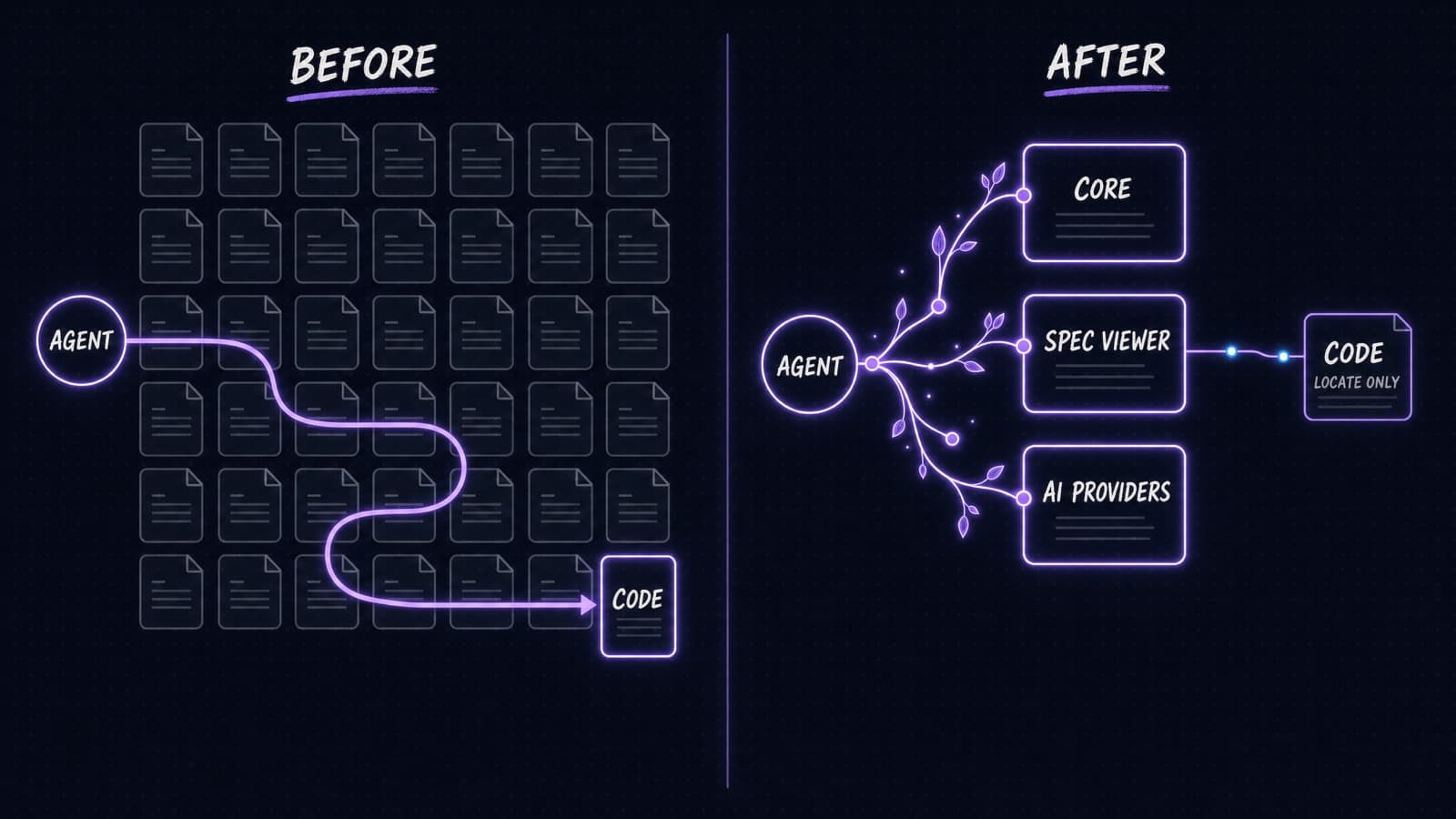
Before living specs, when I asked Claude to work on a feature, it read the codebase. Not the specs. The code, plus whatever scattered documents it could find, reconstructing intent from implementation every single session. 94 specs sat right there in the repo, describing exactly what it was working out from scratch, and it went around them.
Of course it did. I would have done the same. Faced with 238 files, which ones are current? You don't know. The rational move is to read the code.
So the folder wasn't just unread by me. It was unread by the machine that wrote it.
Here's the line I'd put on a wall: a spec that nothing reads isn't documentation, it's exhaust.
Once I saw it that way, the question had a different shape. It moved from "how do I organize my specs" to "what does the agent load before it starts."
There are two extensions, and only one of them is a GUI
Before we get to the mechanism, a clarification is needed, as this is the single most common misunderstanding about SpecKit Companion, and it matters for everything below.
It reads as a VS Code thing. It isn't.
The VS Code extension is the GUI. The sidebar, per-spec status, the pipeline rail, the Resume button, inline review. It's the half you look at.
The spec-kit extension installs into spec-kit itself and runs on the command line. It records the lifecycle, right-sizes the pipeline, assembles commands from nodes, and extracts living specs. There's no editor involved.
Neither half depends on the other. The command-line half writes a plain .spec-context.json into each spec directory, and the GUI reads that. That file is the entire handoff, and it's an ordinary JSON, so anything else can read it too.
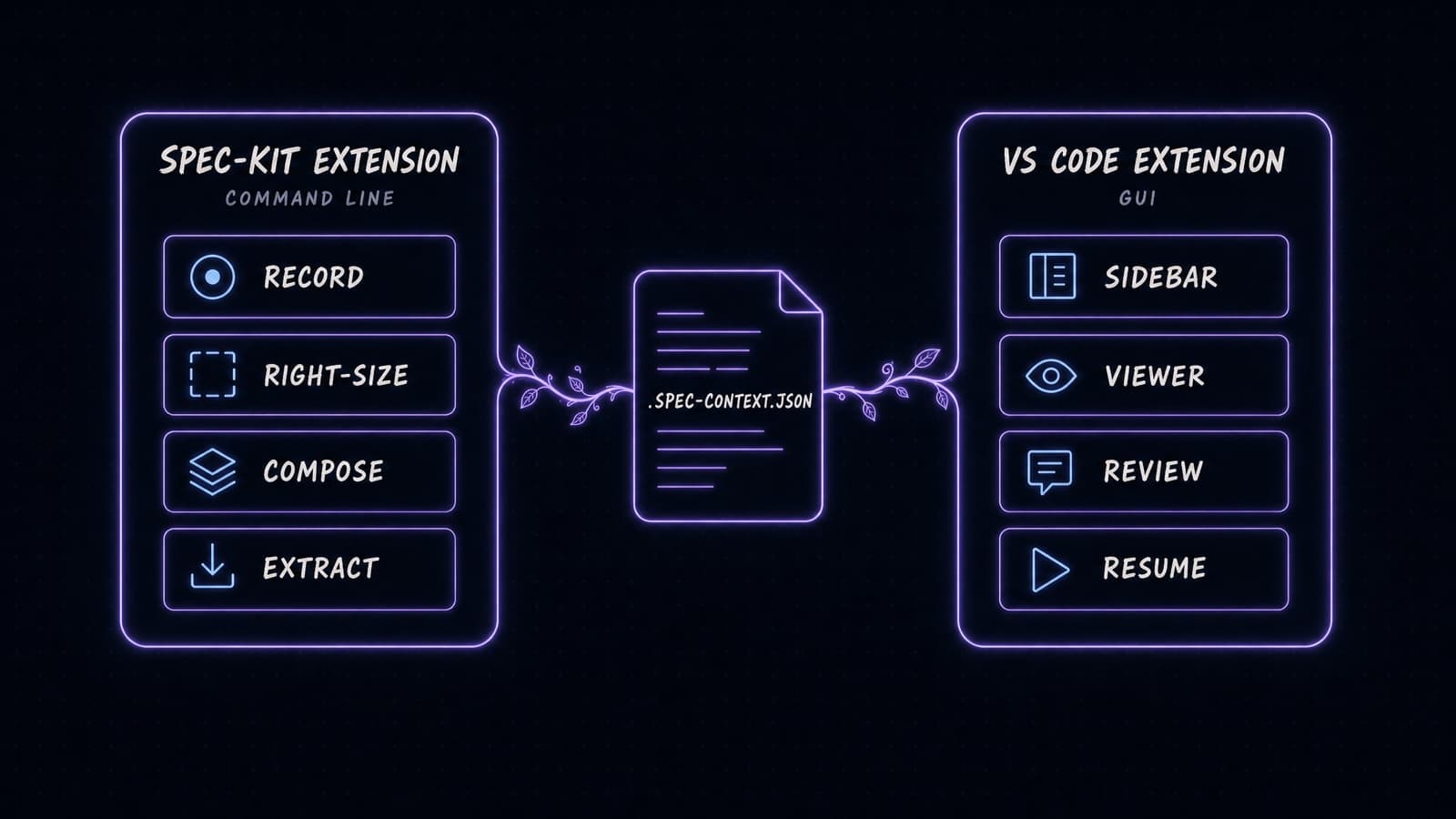
Which means: the command-line part generates living specs, drift detection, and the run record. And if you never open VS Code, you get all of them.
I'll take the blame for the confusion. I started with the GUI and the product outgrew it, and the naming is still a reflection of that history. While we are here, one asymmetry is worth stating plainly: the GUI doesn't support every AI provider yet. The spec-kit extension does, matching stock spec-kit's set.
Living specs invert the read order
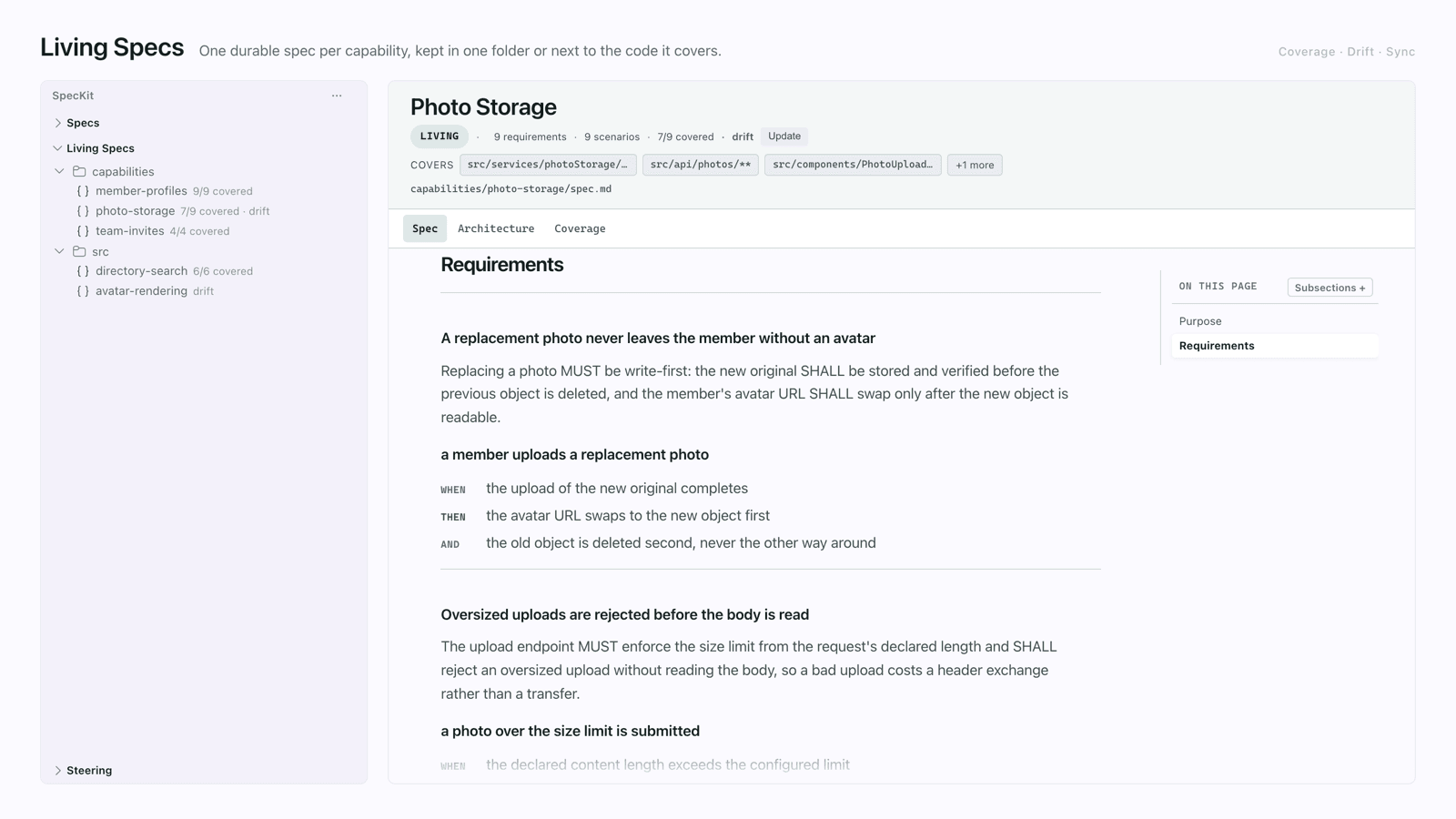
A living spec is one spec per capability, not one spec per change. Checkout. Auth. Billing. In this repo: core, spec viewer, AI providers, and eleven more. 238 files and 15,225 lines of feature specs become 14 files and 3,112 lines.
The feature specs went nowhere. They got relegated. They're the artifacts of the work now, the record of what happened during a run, not the record of what's true. That distinction is the whole point.
The extraction step is what makes it work, and it isn't a copy. When a feature ships, the extraction compares the living spec to the code and reconciles both, so what lands is what the code actually does, not what the feature spec hoped it would do.
Then the read order reverses. The agent loads the living spec first, and reads code only to discover where the capability lives, not to discover what it does.
Here's the portable version of that: when I build the next feature without any spec-kit, in a plain prompt, the living specs still answer what the capability needs. They are not tied to the workflow that created them.
You can store them centrally in a capabilities folder, or colocated with the code they describe. One reversible command lets you flip between them.
Four questions that follow
Once specs are readable again, four things you couldn't ask before become askable.
Are they still true?
Companion commands update living specs. Work done outside Companion, a quick fix in a plain prompt on a Friday, leaves requirements that nothing recorded.
That's where drift detection comes in. It flags which capability's source files have been changed since its spec was last committed. Then the repair command rereads the actual code changes, compares them to the living spec and adjusts it.
You turn it on repo by repo, it just adds to a spec, and a flag never stops a run. Drift is information, not a gate.
Can I verify one run?
The intent, approach, decisions and requirements are distributed across seven artifacts and four phases. You have to read all of them to know if any of it was ever fulfilled. Nobody does.

The Overview is a single page that answers why the spec exists, its constraints, the decisions made and alternatives rejected, each verified check and the command that proves it, and a requirement-to-test coverage table.
The rejected alternatives are more important than they sound. A decision tells you only what was decided. A decision with its rejected alternatives tells you the consequences were considered.
Months later, this is the page that tells you in about ten seconds if a spec is even relevant to what you're looking for.
How do I correct one?
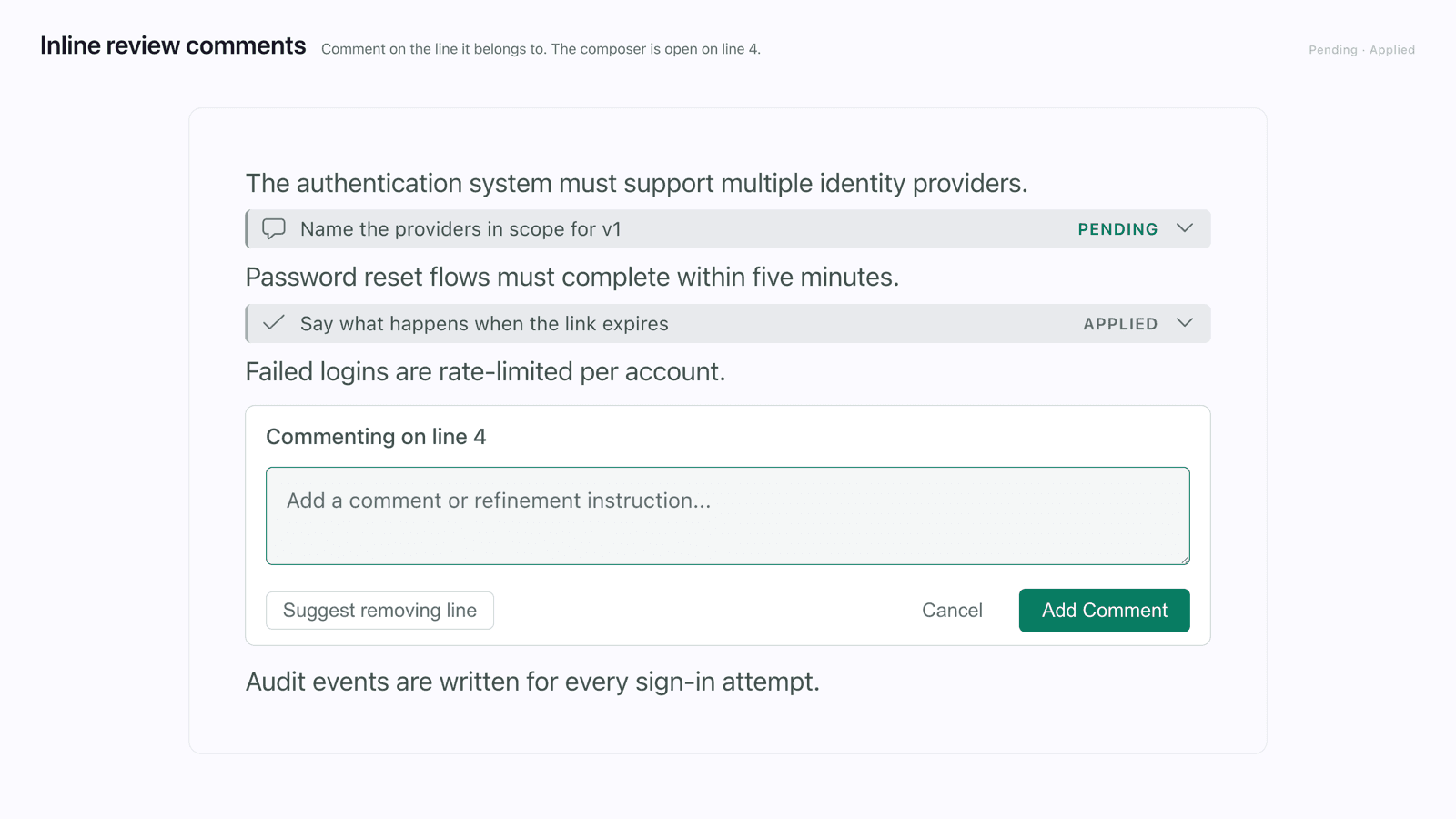
The old way was to type out the correction: "Remember that new service to use, at about line forty, that should be different". Then hope the model gets the line you meant and good luck trying to fix multiple things at the same time.
Inline review comments are the pull request review you already know. Read the artifact, comment on the specific line, hit refine, and the pending comments go to AI as an in-place edit of the source. The model determines the extent: reword the artifact or reconsider that one line.
There is a second use which I did not design, which came from a user. Some comments aren't even directed at the AI. These are notes of why a decision was taken, left for the next person reading the spec. They never leave.
I am more likely to give up on reviews halfway than to finish them. Comments are saved as you type and committed with the repo. Next session, the half-done one is still there or on the other machine.
Does a renamed button need all of this?
Here's stock spec-kit's honest failure. Every change goes through the full pipeline, so every change is a decision to use spec-kit or not. You touch two files, and go for a simple prompt.
I run into this all the time with little things. Moving a button in the sidebar. Adding a context menu item. Renaming something.
Fast mode detects the change and folds the pipeline for the small ones. But the reason I'm still running the pipeline for a renamed button isn't what you'd think. My workflow is already review, open the PR, wait for it, merge. Not doing the pipeline means hand-prompting all four of those over and over.
It composes with auto mode. For a small change I don't need to review the spec, the plan, and the design. It goes from issue link to PR without stopping, and fast mode makes it quick, not ceremonial.
The measured version, from a benchmark across both workflows: Companion specs are approximately 60 to 68% leaner and write no throw-away side files at any size. Correctness was tied, with every cell in both workflows shipping a passing build against an all-green regression suite and scored 5.0 out of 5 on an independent-judge rubric. Ceremony is the variable, not whether the feature works.
Where it still loses
The two-extension confusion above is the real adoption cost, and I haven't solved it, only explained it.
Living specs adoption on an existing codebase is the part I'm least sure of. There's a brownfield adoption path, but it needs more feedback than it's had. Usage is nowhere near OpenSpec's, and I don't have enough signal yet to know which parts of it are wrong.
The customization claim needs an honest edge too. Every part of the process is configurable: the steps, the templates, the artifacts, the hooks, which skills attach where. I built that deliberately, because every SDD framework I tried boxed me into its own commands, and I walked through building one from scratch in Build Your Own SDD Workflow and Custom Workflows. But everything being configurable means there's more to configure, and the default path has to be good enough that most people never touch it. I'm not certain it is yet.
What I'd take from this
The useful question in spec-driven development is not how much spec you write. It's what gets read later, and by whom.
94 specs nobody opened taught me less than 14 that get loaded every session.
Both halves are useful, and they work better together, and the docs are at speckit-companion.dev, if you want to try them out in your own repo.
I cut three threads to keep this one readable: adopting living specs on an existing codebase, what the fast-mode short circuit actually decides, and running auto mode end to end. Each is a separate piece and I'll write them up next.