
Build Log 4: Your Pipeline, as Nodes
SpecKit Companion's pipeline is now a list of nodes, not hardcoded steps. Three confusing toggles collapse into one picker, and the workflow finishes itself.
How many settings should it take to answer one question?
The question was simple: how much ceremony do you want for this change? But SpecKit Companion had grown three different knobs to answer it. There was Template Profile (standard / turbo / off). There was a Turbo Workflow Picker. There was a Complexity Fast Path toggle. Each one earned its place honestly, shipped for a real reason in its own build log. That is the part worth saying out loud: none of them was a mistake on its own.
But stacked together, they were a maze. I built them, and even I had to stop and think about which combination did what.
That is the smell of a design problem. When the controls for one decision multiply, the decision is the thing that needs fixing, not the controls.
So this wave replaced all three with one idea: your pipeline is now a plain list of steps you can read, reorder, and add to, instead of a fixed sequence buried in code. Three toggles collapse into one picker, and when the list finishes it marks the spec done on its own.
The knobs were patches on something deeper
Here's the thing the toggles were quietly admitting: the pipeline underneath was hardcoded. It was always the same fixed sequence, specify then plan then tasks then implement, baked into the code. The settings couldn't reshape that sequence. All they could do was nudge it from the outside, trimming a template here, skipping a step there. Three knobs, all working around the same limitation.
You can see the cost up close in one file. The specify command was 142 lines doing seven different jobs back to back, and three of those jobs were copy-pasted to live somewhere else too. The logic that sizes a change as small or large sat inside specify, and inside a standalone classify command, and described a third time in the workflow file. So "change how we decide a change is small" meant editing the same idea in three places and hoping they stayed in sync. There was even a parity checker whose entire job was to catch them drifting apart. When you need a robot to babysit your copies, the copies are the problem.
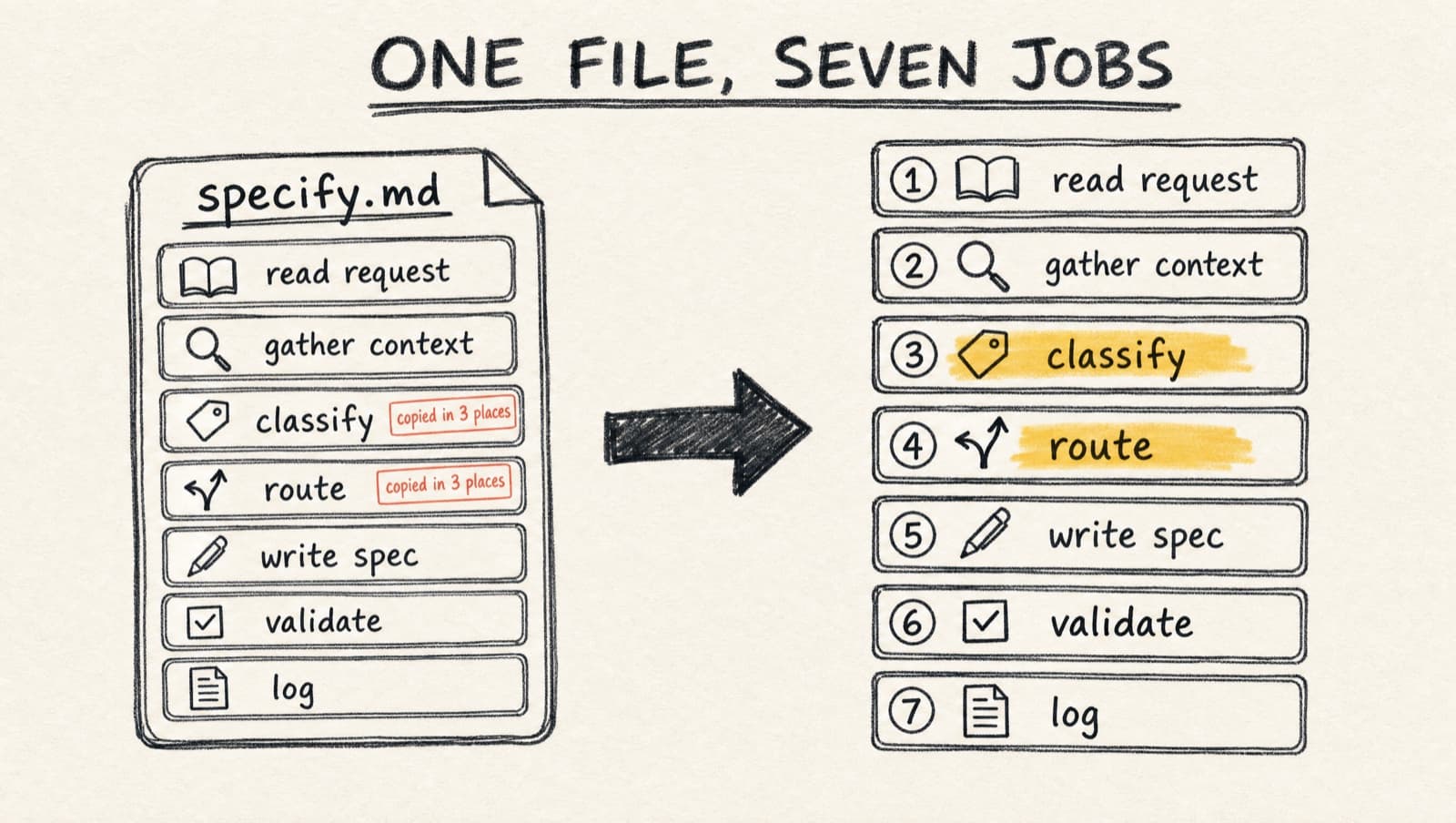
On the left: one file doing seven jobs, the sizing logic tagged in all three places it got copied. On the right: that same idea collapsed into a single node. Everything in this wave is the move from left to right.
So the real fix was never "remove a setting." It was to change what the pipeline is.
Your pipeline is now a list of nodes
Stop treating the pipeline as code. Treat it as data. A workflow is just an ordered list of nodes, and now it literally is one:
# 📃 speckit-companion.workflow.yml
steps:
  - id: specify # 👇 writes the spec
  - id: classify # 👇 sizes the change: small | normal | oversized
  - id: route # 👇 the fork: less ceremony for small, full pipeline otherwise
  - id: mark-complete # 👇 the last node: writes status: completed
So what is a node? It's just a named step with a job, and there are only four jobs it can have. Here they are, side by side:
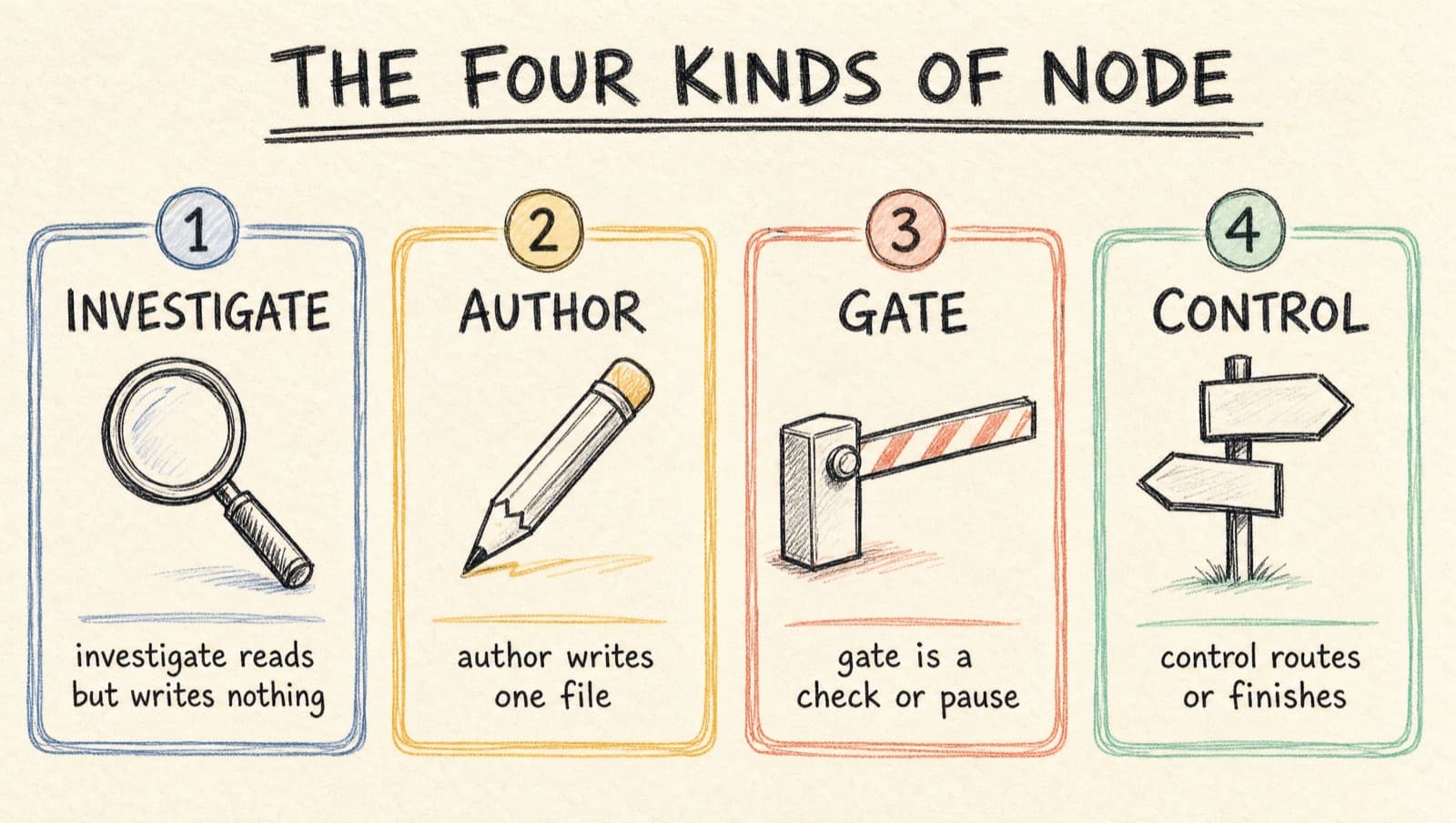
A node either investigates (reads the request and the code, gathers understanding, writes no document), authors (writes one specific file or section, like specify producing the spec), gates (a check or review pause), or controls (routes or finishes, like route and mark-complete). Notice there's no fifth kind. That constraint is the trick: because a node can only do one of four things, the workflow reads like a sentence instead of a program. Write the spec, size it, fork on the size, finish. That's all a pipeline is now.
(Today these are whole commands lined up. The next step is finer grained, letting the sections inside a command be nodes too, so you could pick exactly which parts of a spec get written. That's still being built; the grammar above is what it'll be built on.)
This is the whole point of the wave, so it is worth sitting on. Once the pipeline is a list, the things the old toggles fought for stop being toggles and become nodes in the list.
"Less ceremony for a small change" used to be the Complexity Fast Path setting. Now it is the route node. It reads the size from classify and picks a path: a small change runs plan and tasks without the review-gate pauses, anything normal runs the full gated pipeline, and an oversized change warns out loud and then runs the full pipeline anyway. The safe default is always the full path, so an unclear size never silently drops a step.
"Mark the spec done when it's actually done" used to be a manual click. Now it is the terminal node. When the list finishes, the spec lands at completed on its own.
Put it together and the fork you used to toggle is right there in the list:
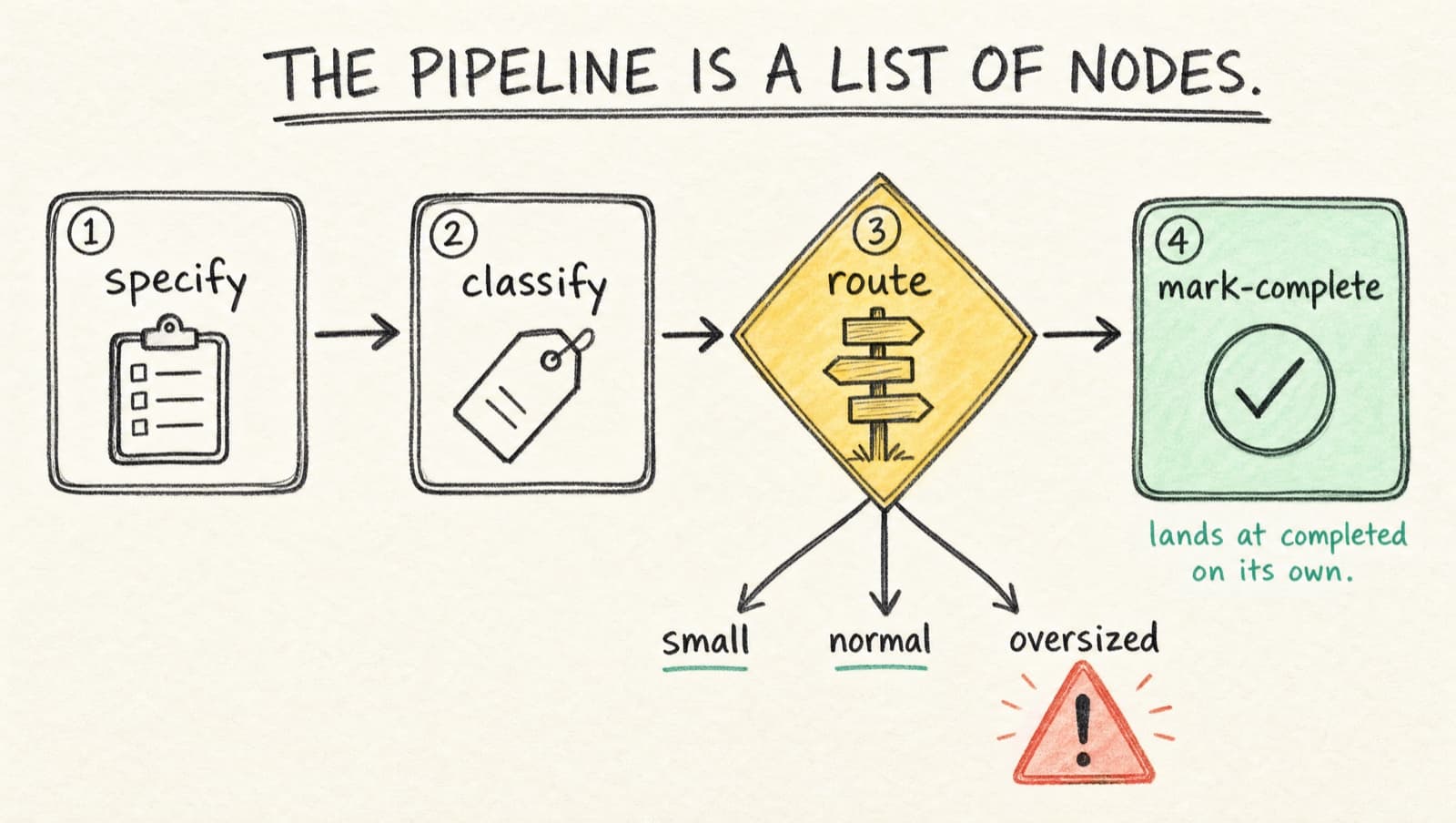
The diamond is route, reading the size and picking a path. The mint check is the terminal node closing the spec. What used to be two hidden toggles is now two visible nodes you can point at.
Nothing here is a new setting. The behavior moved into the workflow, where you can see it and reshape it, instead of living in a pile of checkboxes that hide it.
What you actually see today: one picker
The structural change is large. The visible change is small, and that's fine. The three Beta toggles are gone, replaced by one setting with exactly two values:
// 📃 settings.json
"speckit.defaultWorkflow": "companion"  // 👈 or "speckit". That's the whole menu.
The Create Spec picker pre-selects your choice. Pick SpecKit and you get the stock pipeline, untouched. Pick SpecKit Companion and you get the leaner one, right-sizing built in.
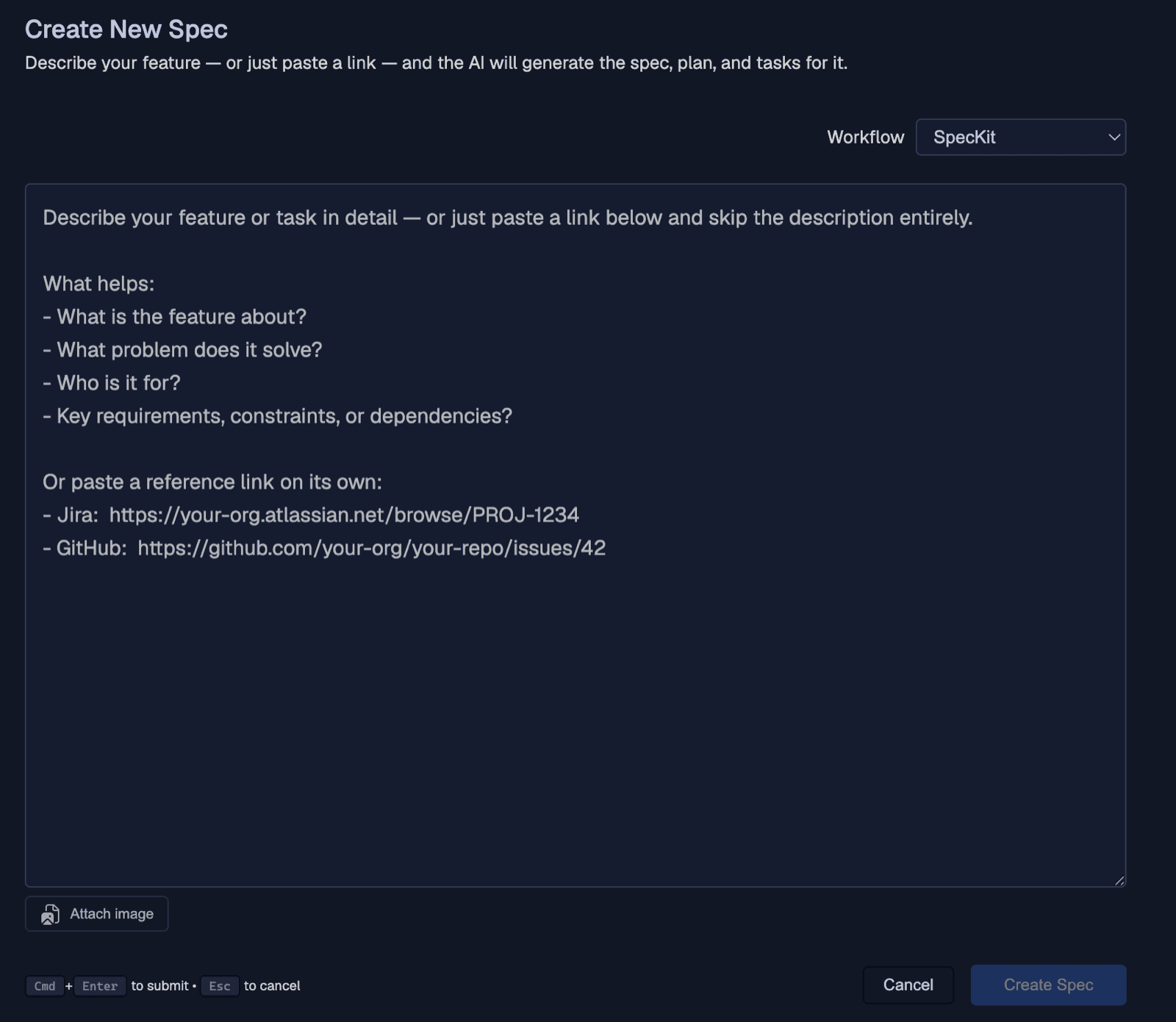
One dropdown, two values. That is the entire visible surface of everything above: all the node machinery, reduced to a single choice at the top of the page.
And because deleting settings is its own kind of risk, the extension migrates on activation. It drops the three retired keys at every scope and coerces the old values, so a leftover entry in someone's settings.json does not break activation. That bug bit me once with a renamed provider. Not again.
Now the honest part, because build-in-public is worthless if it only shows the wins. Since the draft, the commands learned to read the list and walk it themselves. In an agentic CLI like Claude Code, you run specify and it advances to the next node on its own, with the terminal node wired to mark the spec complete. That self-advance is real and shipped.
The finish line used to be the catch. A panel run would get most of the way and then stick at implementing, because two writers raced on the same status file. That one is fixed now: status only ever moves forward, so a late or duplicate write can't drag a spec backward, and the terminal node lands it at completed on its own.
What's left is cosmetic. One of the close paths can still write a duplicate "done" line into the history, and there's a ticket open for it. The completion itself is solid.
Two ways to walk the same list, stacked:
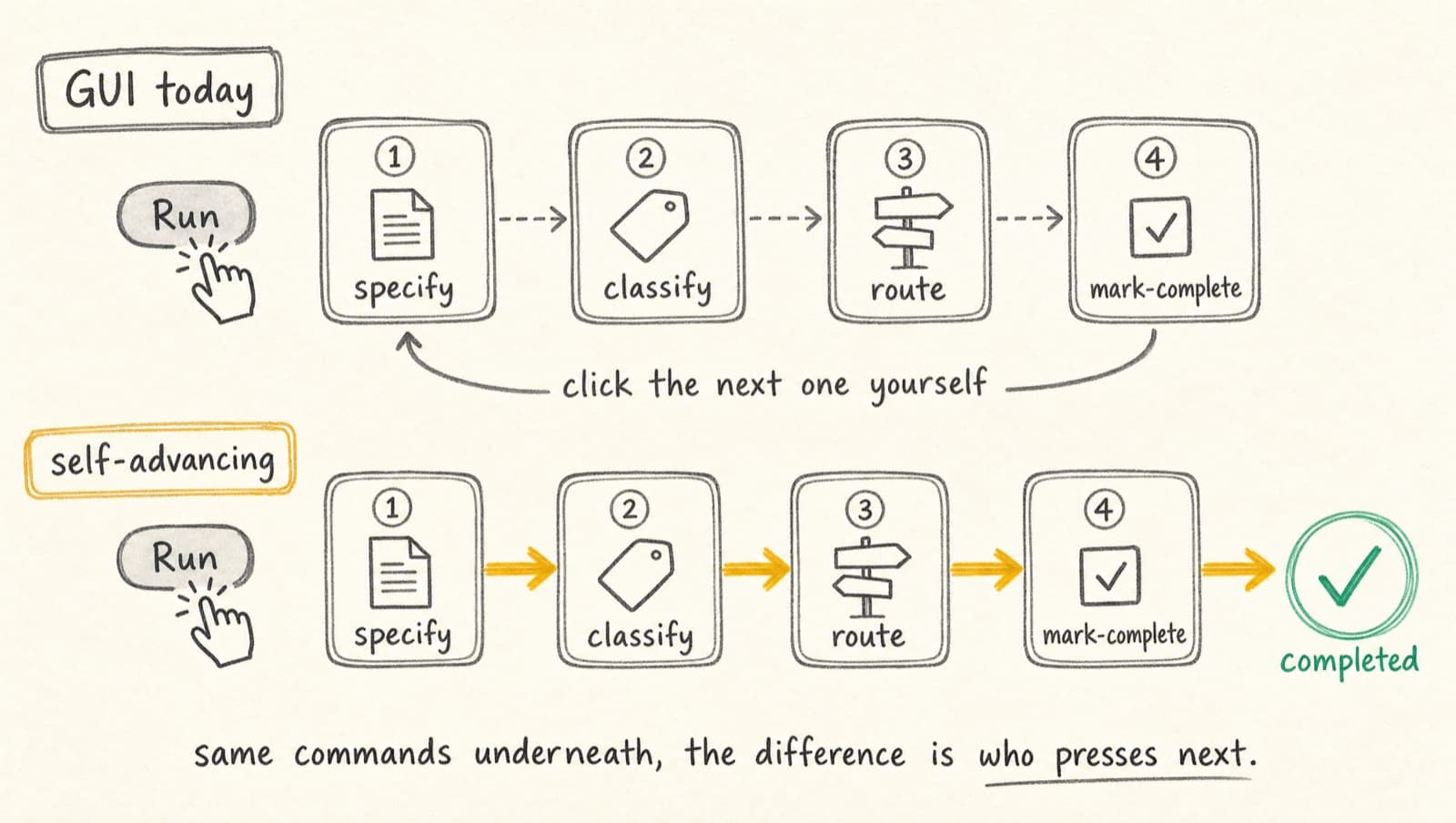
Same nodes, same commands underneath. The only thing that changes between the lanes is who presses next: you, clicking through in a one-shot chat, or the agent walking the list on its own in a CLI that keeps going.
The receipt: I shipped this wave's own ticket through it
The right-sizing is already real, and I have the receipt. I built one of this wave's own tickets through the Companion workflow: the Create Spec polish, the very page that picker lives on. It's a small change, a few CSS tweaks and some placeholder copy, so the workflow sized it small and folded the plan and tasks steps. Those two steps, which on a real feature take minutes of generation, finished in about 80 milliseconds each. For a small change there's nothing heavy to write. The plan file came out 204 bytes. Seven tasks, the full suite green (998 tests), and the spec closed out completed. The fold isn't a someday promise. It already runs.
When the plan met reality
The best part of this wave was the part that went wrong on paper first.
My ticket confidently described how to build the workflow, and it was wrong in three specific ways. I only found out because I checked against the actually-installed spec-kit before writing a line of YAML. The routing step I planned didn't exist under that name. Workflows turned out not to register through the extension manifest at all; they live in their own catalog. And my version floor quietly excluded the exact pre-release builds the install produces.
Three assumptions, three corrections, zero wasted implementation. That is the whole argument for a pre-flight pass. An hour reading the tool you actually have beats a day building against the tool you imagined.
The engine I almost rode
The tempting version of this is to write my own runner: a loop that walks the nodes, handles the gates, manages pause and resume. That's a lot of code, so my first instinct was to dodge it entirely. Spec-kit ships its own workflow engine, and on paper it does everything: steps, gates, conditional routing, pause and resume from the exact node you stopped on. Ride that, I figured, and Companion gets a real runner for free.
Then I actually checked. That engine is genuinely capable, but in this project nothing had wired it up yet: the Companion workflow wasn't registered with it, and every spec I'd shipped, mine and the demos, had run the way people actually run them, one command at a time. Hanging the whole roadmap on a runner that nothing here had ever connected to meant building for a tool I imagined instead of the one in front of me. So I asked a smaller question: where does the self-advance actually need to live?
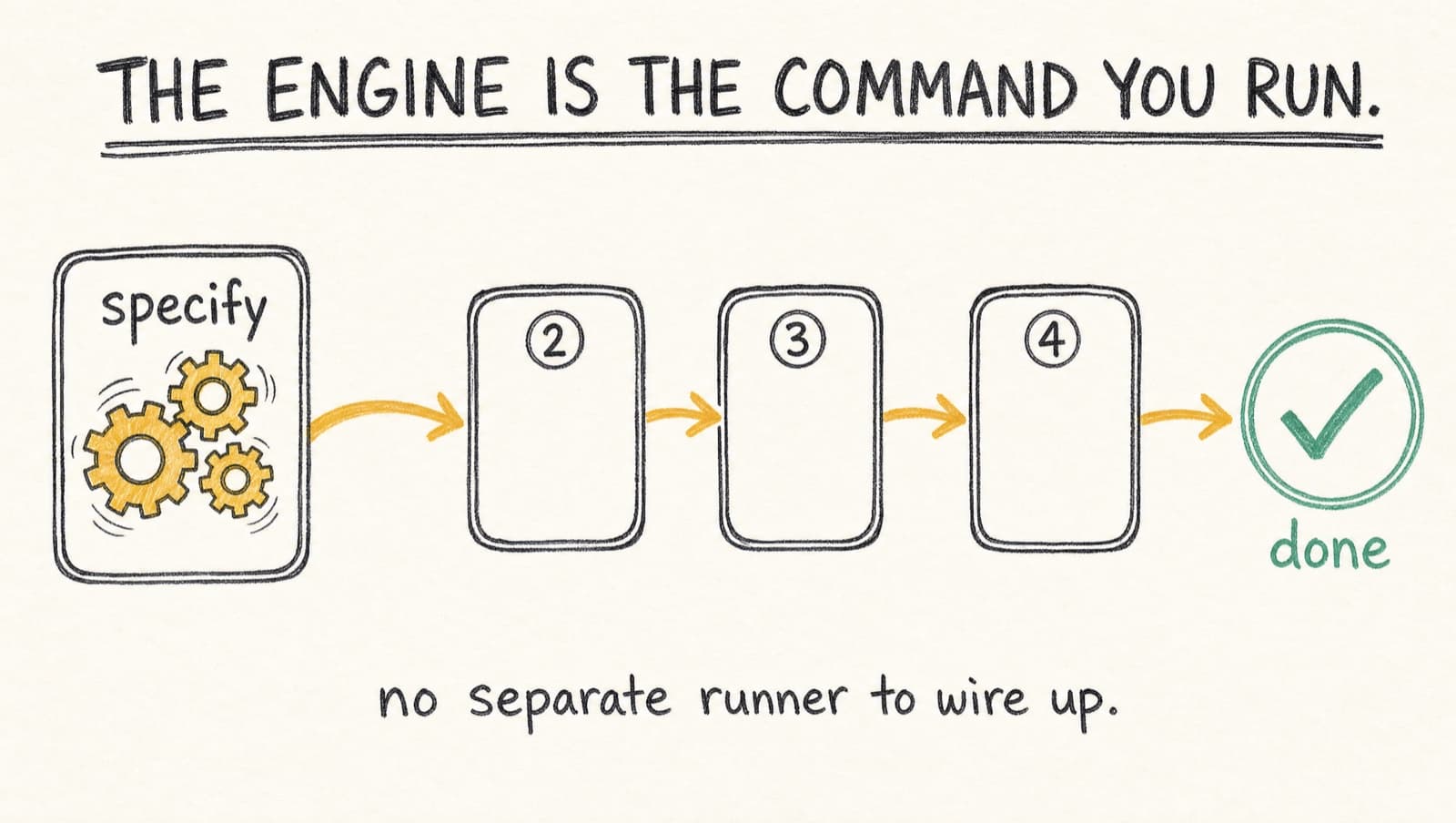
The picture is the answer: the gears live inside the command you already run, not in a separate box you have to start first. Instead of a standalone runner, the command does its own node, then reads the list, finds the next node, and keeps going. Nothing extra to invoke. Running specify is running the first node of the engine. The decision that changed this wave was where the engine goes, and the answer turned out to be "the thing you already run."
Two honest limits, because this is the part that bites if you don't say it out loud. First, "keep going on your own" needs an agent that keeps acting after a step. So ask one question before you lean on self-advance: does your tool keep acting after a reply, or stop dead after one? Claude Code and the agentic CLIs keep going. Some one-shot IDE chats stop, and there the fallback is you, or the GUI button, firing the next step. The rule the commands carry is "continue if you can." Second, "read the list and run the next node" is the model following instructions, not a bulletproof loop. The bulletproof version is exactly specify workflow run from a terminal, and that's the command nobody wants to type. So this is a deliberate trade: self-advance that works in your everyday flow with zero special commands, leaning on the agent instead of a hard engine, with the terminal runner still there for anyone who wants the guaranteed version.
What this wave taught me
- When one decision needs three toggles, fix the decision, not the toggles. Multiplying controls is the smell; the rigid thing underneath is the real bug.
- Make the pipeline data, not code. A workflow you can read as a list is one you can reorder and extend without editing a command.
- Check the tool you actually have before you build against it. An hour reading the installed spec-kit caught three wrong assumptions and saved a day of rework.
- Put the engine in the thing you already run. Self-advance lives in the command, so there's no separate runner to wire up.
What's next
Here is the part this was all for, and it is no longer a someday promise. The pipeline being a list means you grow it by adding to the list, and the first real addition already runs. A Companion run now ends reviewed and PR'd instead of as raw code: right before it marks the spec complete, it reviews its own diff against the project's conventions, runs a simplifier pass, and opens a pull request, stopping before merge. None of that is new code in the extension. It is a handful of lines in a .specify/companion.yml file that the command reads at run time and slots in at the right moment.
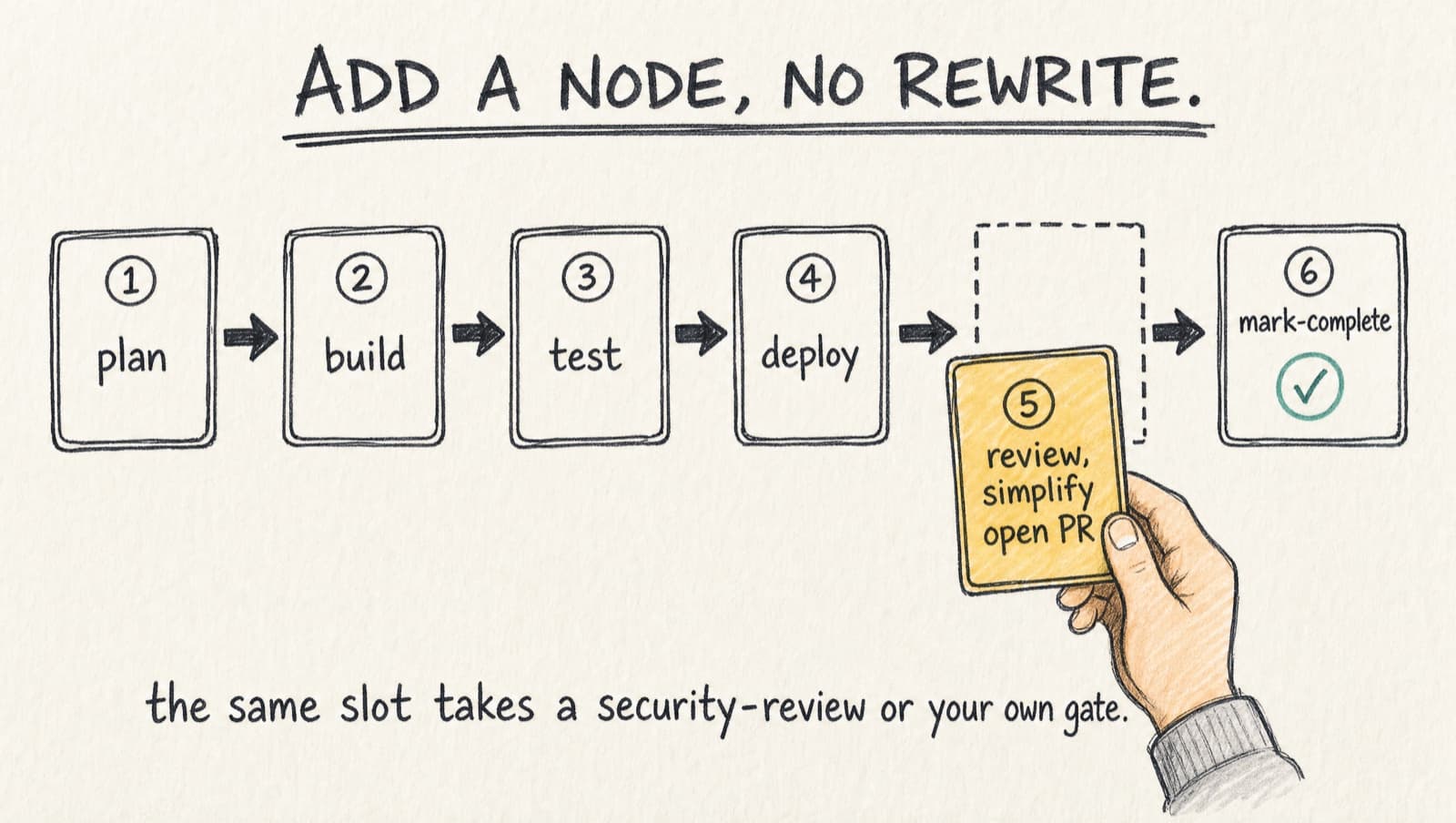
Notice what does not change in that picture. The new node (marigold) drops in one slot before the finish, and every command around it stays exactly as it was. That is what "grow it by adding to the list" actually looks like.
That is the whole shape of it: because it's just entries in a list, you add your own without rewriting any command. Drop in a security review, pick the exact author steps your team wants, skip the rest. None of it is a new toggle.
What's genuinely still ahead is making it effortless: a hands-off auto mode that runs the whole list start to finish without anyone pressing next. That has since shipped too, so the next build log is its story.
Same pipeline. Next time, it drives itself.


