Build Log 3: Turbo Mode and the Fast Path
Giving spec-kit a leaner, faster shape without forking it: turbo mode, a fast-path that skips plan/tasks on small changes, and why it all shipped opt-in.
spec-kit treats a typo fix and a brand new auth system exactly the same way. Same eight files in the spec folder. Same user-story scaffolding. Same heavy pipeline, whether the change earns it or not.
For most of what I ship, that is ceremony I never read. A User Scenarios block, a separate checklists/requirements.md gate, a quickstart.md, a dual-option Project Structure tree. All of it generated, none of it touched.
I had already built a leaner shape into SDD: about three files instead of eight, a short Overview instead of user stories. So this step had two goals. Give spec-kit that same shape without forking it. Then go one further and stop making a one-line change walk the whole pipeline at all.
That turned into two features, and a week of churn before they settled into a shape I would actually ship.
What I shipped
Two features came out of this, and they solve the same problem from two different angles: a typo fix and a new auth system should not cost the same ceremony.
Turbo mode changes the shape of a spec. Same seven commands, but leaner output: no user stories, tasks grouped by the files they touch, side documents written only when they help. A smaller spec folder.
The Fast Path changes the flow. When a change is genuinely small, it short-circuits the pipeline. No separate plan and tasks stages. It goes straight from specify to implement, in a single run.
Turbo stands on its own. The Fast Path builds on it, because skipping plan and tasks only makes sense once the shape is already lean, so it fires only when turbo is on. In settings they are two independent switches: speckit.companion.templateProfile for turbo, speckit.companion.complexityFastPath for the Fast Path. Both ship opt-in beta. The next two sections take each one in turn: what it is, how to turn it on, and exactly how it compares.
Turbo mode
What it is. A second shape for the same seven spec-kit commands. companion-standard is the stock commands, unchanged, with honest timing added. companion-turbo keeps those same commands but trims the heavy parts: the user stories collapse into a three-line Overview, tasks group by files and dependencies, and the side documents get written only when they actually help. A third value, off, means plain upstream spec-kit with no overrides at all.
A quick honesty note on the name. This shipped as lean first. I renamed it to turbo before any release, with no alias and no migration. "Lean" sold the wrong thing. The point is not fewer files. The point is that it is faster.
How to enable it. Set the project default speckit.companion.templateProfile to turbo. It defaults to off, so this is opt-in.
# 📃 .specify/companion.yml  (machine-local, gitignored)
templateProfile: turbo
Each spec then carries its own profile pin in .spec-context.json, so the choice holds all the way through plan, tasks, and implement. Why that pin matters is its own story, below.
How it differs from standard. Here is the full per-file breakdown:
standard | turbo | |
|---|---|---|
spec.md | User Scenarios / user stories | a 1-3 line Overview, no user stories |
tasks.md axis | grouped by user story, [US#] labels, MVP framing | grouped by files and dependencies, strict [Tn] [P?] + path |
plan.md | dual-option Project Structure + Complexity Tracking | a turbo Approach and Structure (files/deps) + Out of Scope |
requirements.md | full checklist, including acceptance scenarios | lean self-check, no user-story items |
research / data-model / contracts/ / quickstart | written by default | on demand only, when they help that change |
| Net spec folder | about 8 files | spec.md + plan.md + tasks.md + requirements.md, side files on demand |
| Timing fidelity | honest finish-only | honest finish-only (identical) |
The same split is easier to see stacked side by side.
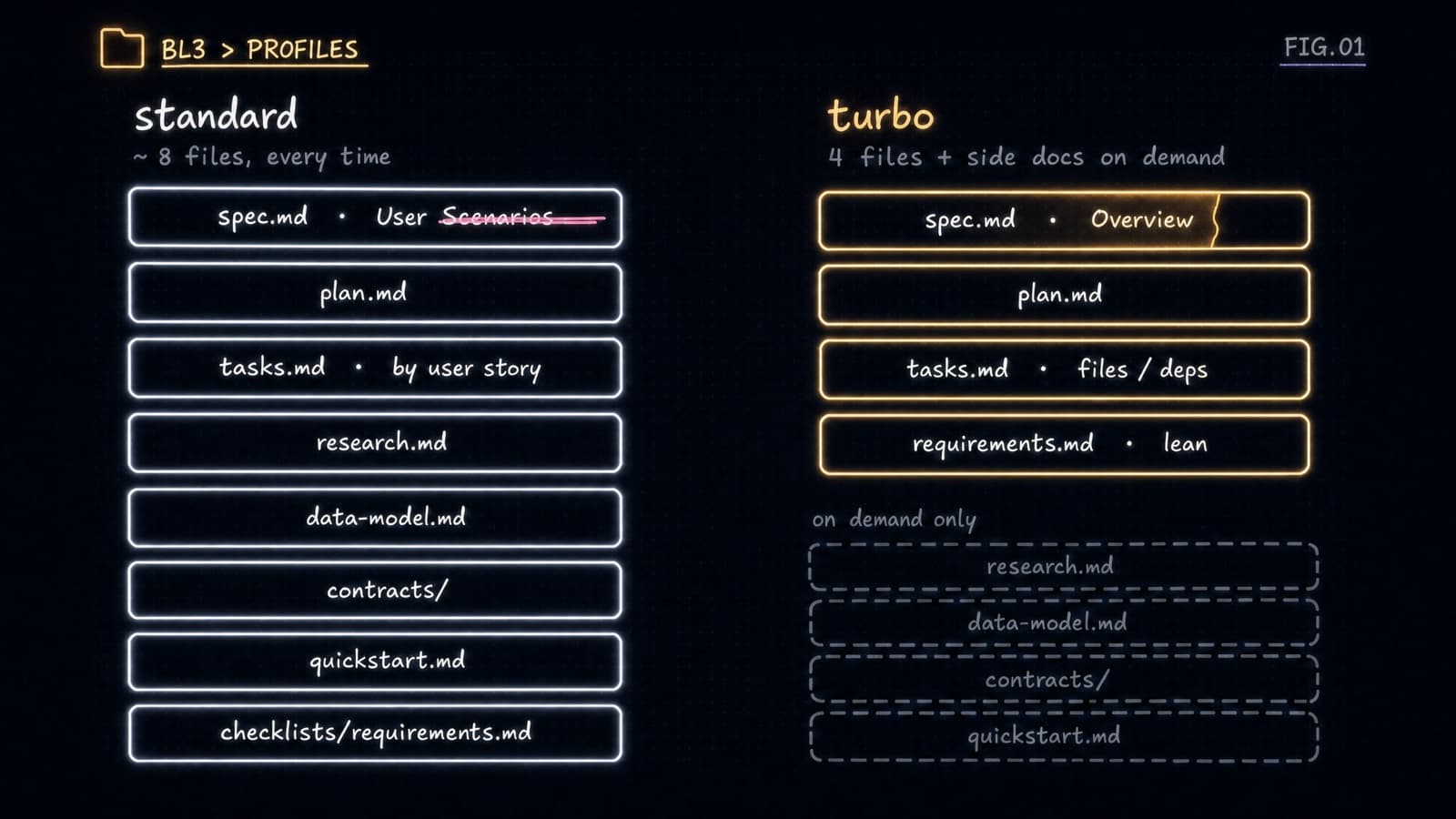
Turbo keeps four files where standard keeps eight, and the user stories are the one block it drops outright.
The Fast Path
What it is. The Fast Path lets a small change skip the middle of the pipeline. Under the hood it is a classify step at the end of turbo's specify command: it reads the spec you just drafted, returns one of two verdicts, simple or normal, and then either short-circuits straight to implement or runs the full pipeline. It is best-effort, and it deliberately errs toward normal. A change never gets under-planned by accident.
It decides on four inputs:
| Input | What it reads | Pushes toward |
|---|---|---|
fastPathEnabled | the complexityFastPath flag | simple only if true |
projectedFiles | files the change will touch, vs a 5-file ceiling | normal if over |
projectedTasks | tasks projected, vs a 10-task ceiling | normal if over |
scopeSignal | scope phrases (rewrite/overhaul/new system vs one-line/rename/typo) | larger forces normal |
A spec is simple only when the flag is on, both projections sit at or under the ceiling, and the scope signal is not larger. Anything else is normal.
How to enable it. Set speckit.companion.complexityFastPath to true. Like turbo, it defaults to false, and it only does anything in turbo mode.
# 📃 .specify/companion.yml
templateProfile: turbo
complexityFastPath: true # 👇 small changes now fast-track to implement
If both the project file and the editor setting are present, the project file wins, and the resolved value is mirrored back so the command body reads a single source of truth.
How it compares. The two branches:
simple (Fast Path) | normal (full pipeline) | |
|---|---|---|
| When | flag on, 5 or fewer files, 10 or fewer tasks, no "rewrite" scope | anything larger, or flag off |
| Artifacts | one combined spec.md (Approach + Implementation Tasks inline) + requirements.md | spec.md, then plan.md, then tasks.md |
| Stages | specify straight to implement (plan/tasks folded) | specify, plan, tasks, implement |
| Lands at | ready-to-implement in one run | each step run on its own |
| Over the guardrail | warns, never a silent fast-track | not applicable |
When the change crosses the guardrail (more than 5 files or 10 tasks, or a "rewrite"-class scope word), the body prints a warning and runs the full pipeline instead. It never silently fast-tracks something big.
The fold is real, not cosmetic. After specify self-closes, the command writes the folded plan and tasks entries itself, the last one marking the spec ready-to-implement. So the Companion viewer reads plan and tasks as satisfied, not missing, and the spec lands ready for implement in a single run. The final completed gate stays a human action.
The whole routing decision reads more clearly as one picture.
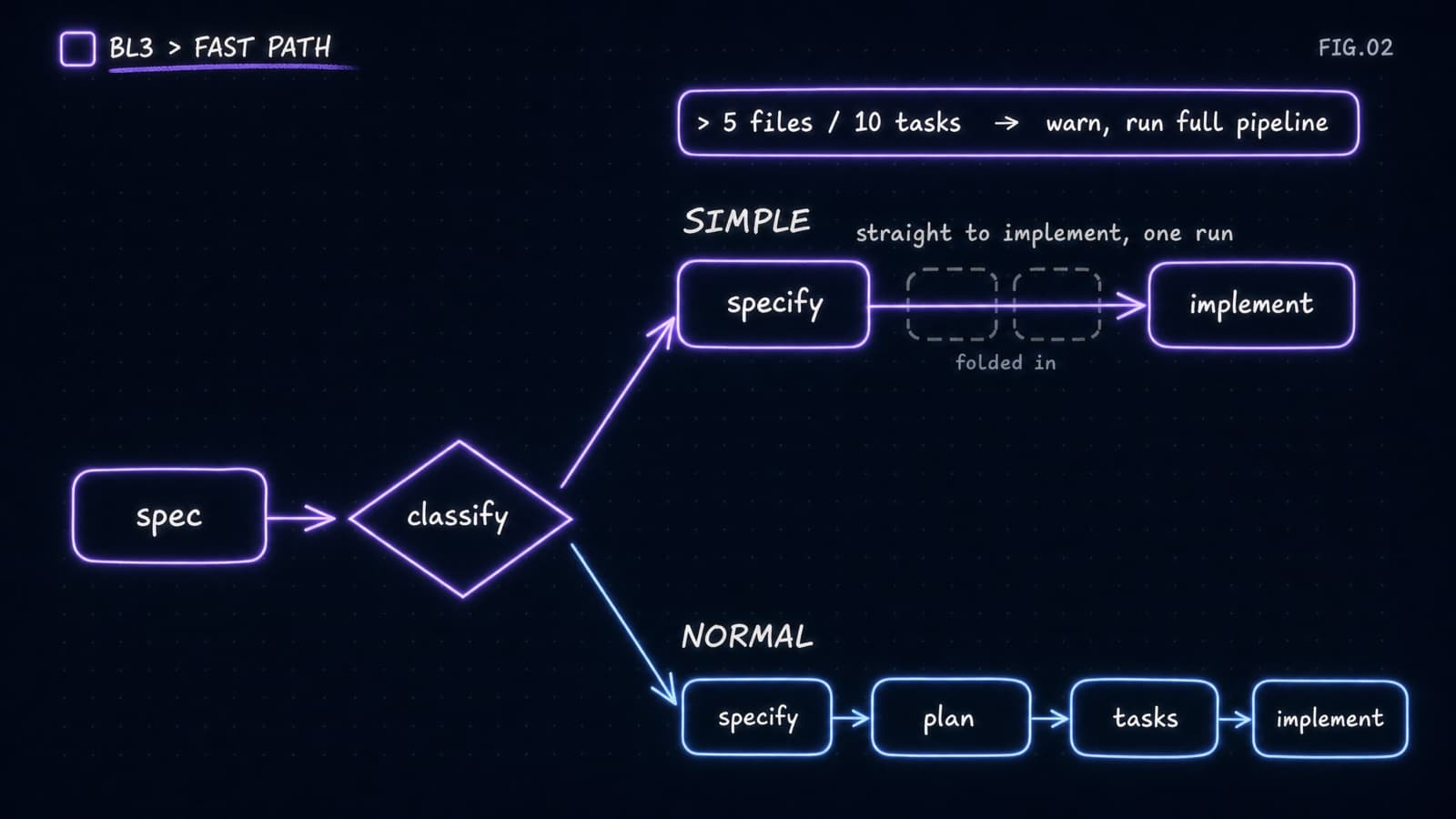
A simple change takes the short express arrow to implement, while anything past the guardrail drops back onto the full four-stage line.
Does it work?
I ran the same feature, on the same codebase, through both shapes. Turbo finished the full pipeline in 12.4 minutes against standard's 21.3, a 42% drop, and produced 3 spec artifacts instead of 8.
| Metric | Standard | Turbo |
|---|---|---|
| Total pipeline | 21.3m | 12.4m (42% faster) |
| specify / plan / tasks / implement | 5.2 / 5.9 / 2.5 / 5.2m | 1.3 / 2.6 / 1.0 / 6.2m |
| Spec artifacts | 8 | 3 |
| Source files touched | 6 | 3 |
| Tasks | 9 | 6 |
Now the honest part. Turbo's implement step was actually slower, 6.2 minutes against 5.2, despite having fewer tasks. That is one run, so it is noise, not evidence that scaffolding speeds up implementation. The lever here is choosing the right profile, not bloating turbo to chase a number. I am calling it out because the tempting conclusion, that more upfront design makes implementation faster, is exactly the one this data does not support.
The Fast Path got its own proof on a real spec. A small install-URL fix, run in turbo with the Fast Path on, emitted one combined spec.md, an Overview plus an inline Approach, and landed at implement in a single shot. After specify self-closed, the command wrote the folded plan and tasks entries itself, with real timestamps:
// 📃 specs/159-inline-install-stable-url/.spec-context.json
// history[]: the two folded entries (abridged)
{ "step": "plan",  "substep": "fast-path",
  "kind": "complete", "by": "ai", "at": "2026-06-13T01:31:19.217Z" },
{ "step": "tasks", "substep": "fast-path",
  "kind": "complete", "by": "ai", "at": "2026-06-13T01:31:19.425Z" }
The eval asserts those folds carry real timestamps and that the spec reaches ready-to-implement, and it stays silent on a normal spec.
Underneath all of it, the timing finally stayed honest. Back in Build Log 2, the eval caught the timing lying. Finish-only journaling is the fix that stuck: it logs one complete event per task and derives every duration from the gaps between finishes. Lap times, not stopwatches. The zero-second ticks, the phantom gaps between tasks, the bursts where a dozen substeps share one timestamp: all gone. The eval runs 13 pass, 0 fail.
Why the shape lives in commands, not templates
The obvious way to reshape a spec is to override the document template, spec-template.md, with a lean one. I built it that way first. It silently did nothing.
The reason is mechanical, not stylistic. A spec-kit preset can override two kinds of file: the command (the prompt the agent runs) and the template (the document scaffold). Template overrides only resolve when a setup script walks the override stack.
planandtasksgo throughsetup-plan.shandsetup-tasks.sh, which do walk the stack. A template override there takes effect.specifycopiestemplates/spec-template.mdby literal path and never runs the resolver. A leanspec-template.mdis simply never read.
So template overrides are mixed: they work for plan and tasks, and no-op for specify. Command overrides apply uniformly to all seven commands. The only reliable single mechanism is to carry the shape in the command bodies, so that is where it lives. The accepted tradeoff: in turbo mode the on-disk spec-template.md still shows the stock shape. Turbo just does not read it.
The two code paths make the mismatch obvious.
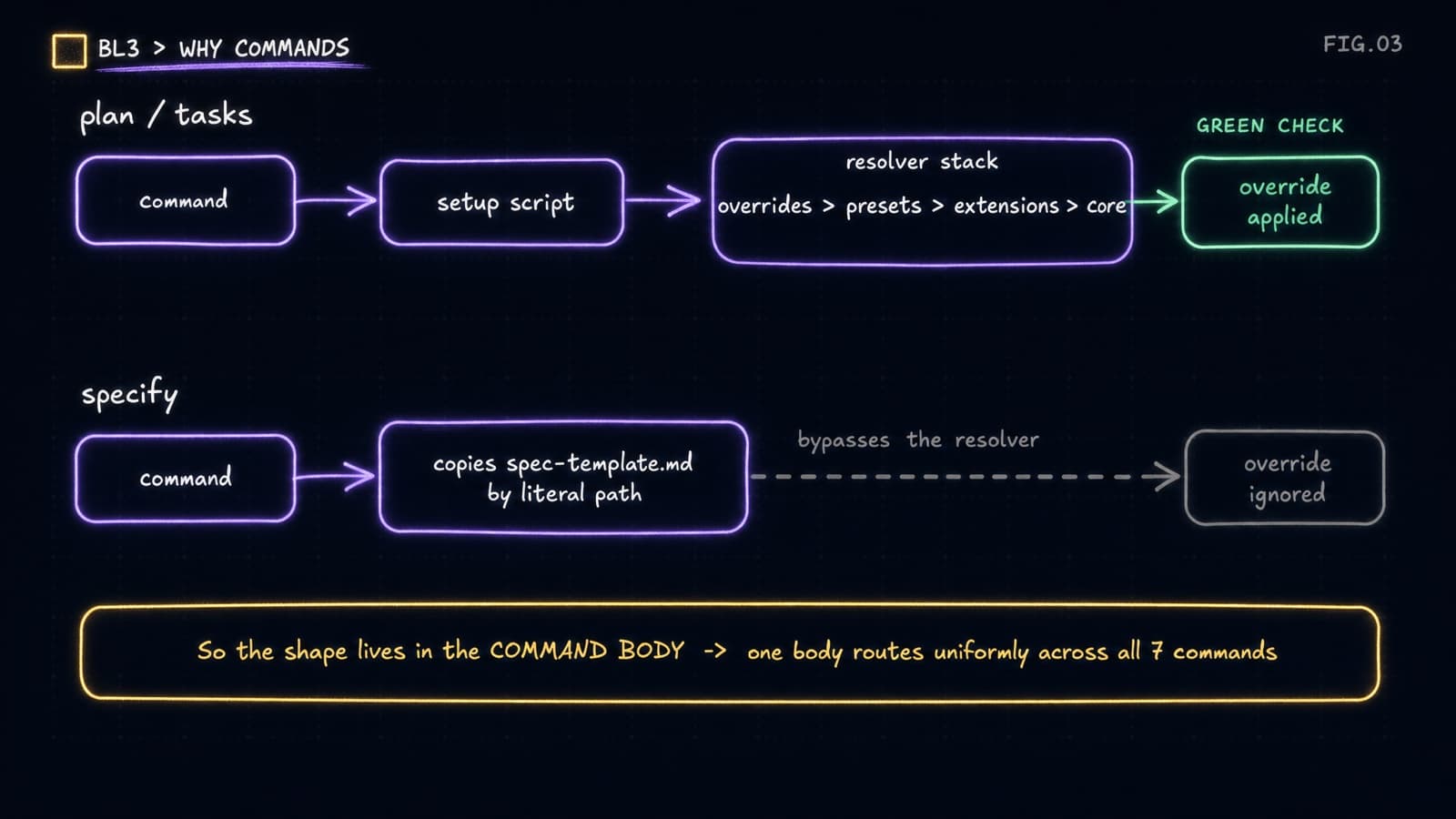
Plan and tasks honor a template override, specify copies the file by literal path and walks right past the resolver, so the shape has to live in the command body to reach all seven commands.
Why modes route, not swap
Once the shape lives in command bodies, the next obvious move is to swap them. Switch to turbo, uninstall the standard commands, install the turbo ones. My first cut did exactly that. The moment you switched mid-pipeline, /speckit-plan failed with "Unknown command."
The fix was to stop deleting things. Keep both command sets installed, and route each command to its /speckit.companion.* twin based on the spec's pinned profile. Nothing gets removed, so switching modes can never strand you. An add-only "ensure standard" runs on activation to re-materialize the stock family on a fresh checkout, and it never removes anything.
The pin also has to be durable. Turbo used to run for specify and then quietly revert to stock for everything after it. The capture script writes .spec-context.json with no profile, and the extension only pinned the profile when it created that file itself. The command always got there first, so the pin was never written. The fix back-fills the pin from the project default on the first lifecycle write:
// 📃 specs/159-inline-install-stable-url/.spec-context.json
{
  "workflow": "speckit",
  "profile": "turbo", // pinned at specify, carried to completed
  "currentStep": "implement",
  "status": "completed"
}
Now the shape carries the whole way through, and existing un-pinned specs heal themselves on their next write.
Where it landed
This is the part a clean changelog hides.
The rename. It shipped as lean, then became turbo before release. No alias, no migration, the old value just gone.
The reversal. I planned all of this to ship on by default, opt-out. It landed opt-in, grouped under a "Beta Features" settings section, both toggles defaulting to off. A half-proven feature does not get to reshape everyone's pipeline by default. Capture and status/resume, the parts that just track your work, stay always-on. They are the v1 core, not a beta.
Here is where the two switches actually surface.
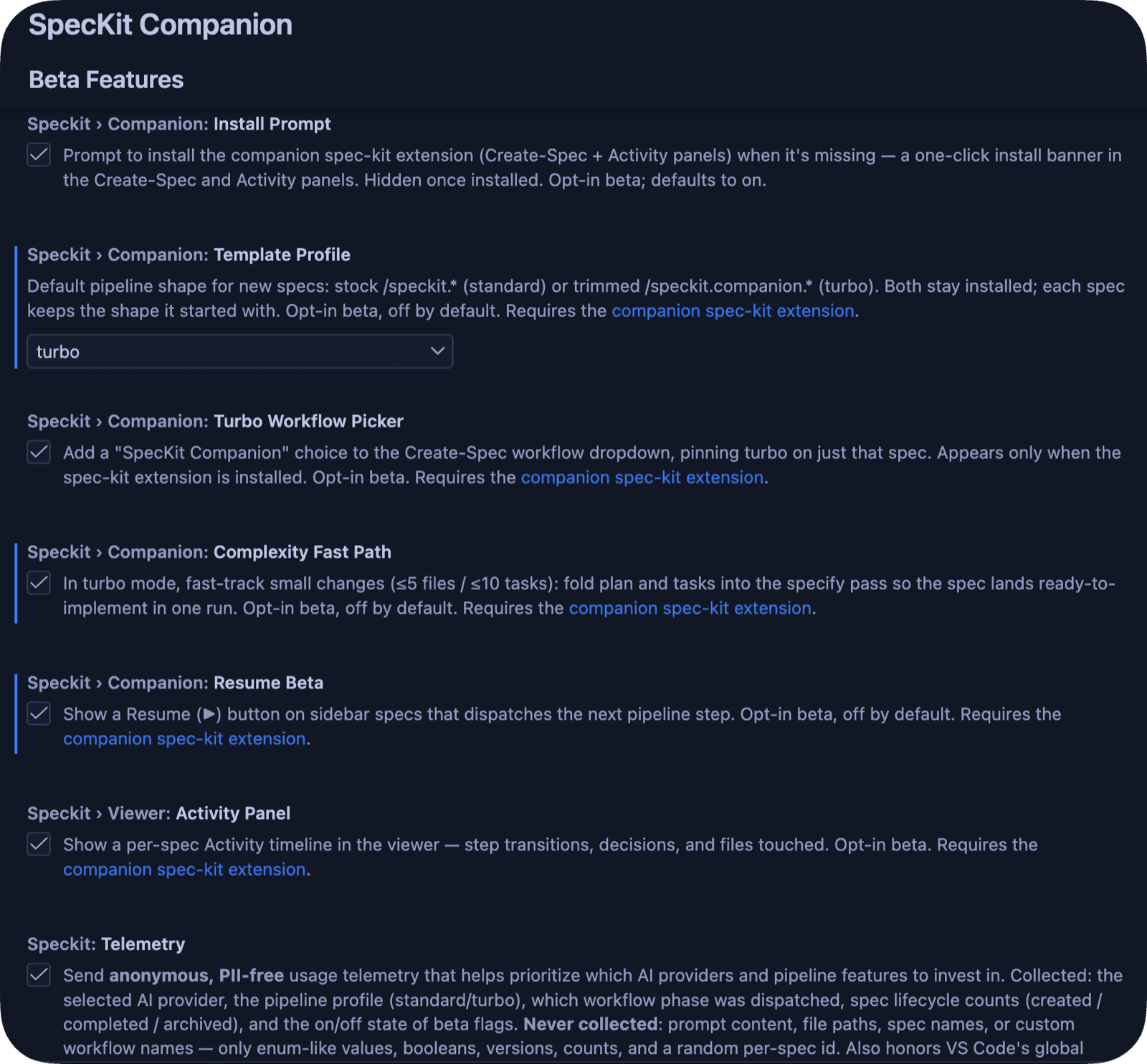
Both live under Beta Features, defaulting to off, so nothing changes until you opt in.
Two housekeeping wins that say more than they look. The published .vsix had bloated to 66.6 MB because it was shipping my entire dev workspace: example sandboxes, caches, spec fixtures. Trimming it to 1.17 MB, roughly 60 times smaller, is just the principle that installing the extension should ship the extension, not my workspace. And .specify/companion.yml is now machine-local and gitignored, so one developer's profile default no longer leaks into everyone else's checkout.
What's next
The Fast Path just merged, so everything this log describes is shipped, opt-in beta for now. Both graduate to on-by-default only after they have proven themselves on enough real specs to earn the trust that capture and resume already have.
Then Build Log 4: giving the pipeline an ending. Today it stops at implement, and the review, the commit, the PR, the mark-complete all still live in my head. Next I make them part of the workflow itself, recorded and on screen. That is also what finally makes auto mode worth having.
The public backlog tracks every step as it merges. Star the repo to follow along, and I will see you at Build Log 4.