Specs That Move In Next to Your Code
How I made SDD adoptable on a real, existing codebase: specs that live next to your code, and /sdd:init that drafts them from the code you already have.
Update — SDD is now the SpecKit Companion. The ideas in this post have been folded into SpecKit Companion, a VS Code extension for spec-driven development. The story of the move starts in Build Log 0.
Last week I shipped living specs. One accumulating spec per domain, loaded automatically, so my specs stop dying the moment a PR merges. I wrote it up in Layered Context Foundation, felt great about it, and then went to use it on a real, existing project.
I hit a wall. Two walls, actually.
The first: to get any value out of living specs, I would have to hand-write one for every domain in a codebase I did not write yesterday. The second: every spec was exiled to a far-off .specs/ folder, nowhere near the code it described. So I did not do it. And if I would not do it on my own feature, nobody else would either. Adoption was a cliff, not a ramp.
A feature you cannot adopt is a feature you do not have. This week I fixed the ramp. Specs can now live right next to the code, and /sdd:init will draft them from your code for you, one area at a time. This is the story of both.
A quick word on SDD
If you already know SDD, skip to the next section.
SDD is my spec-driven development plugin for Claude Code. Every feature runs /sdd:specify → /sdd:plan → /sdd:tasks → /sdd:implement, and living specs accumulate per domain so context stops disappearing. The full model is in Layered Context Foundation. The repo is at github.com/alfredoperez/sdd.
I will reuse one running example throughout: a project management app with tasks and users domains, the same one from the last article. The twist this time is that the app already exists. The code is there, the conventions are there, and not a single living spec is.
Wall 1: specs were stuck in one folder
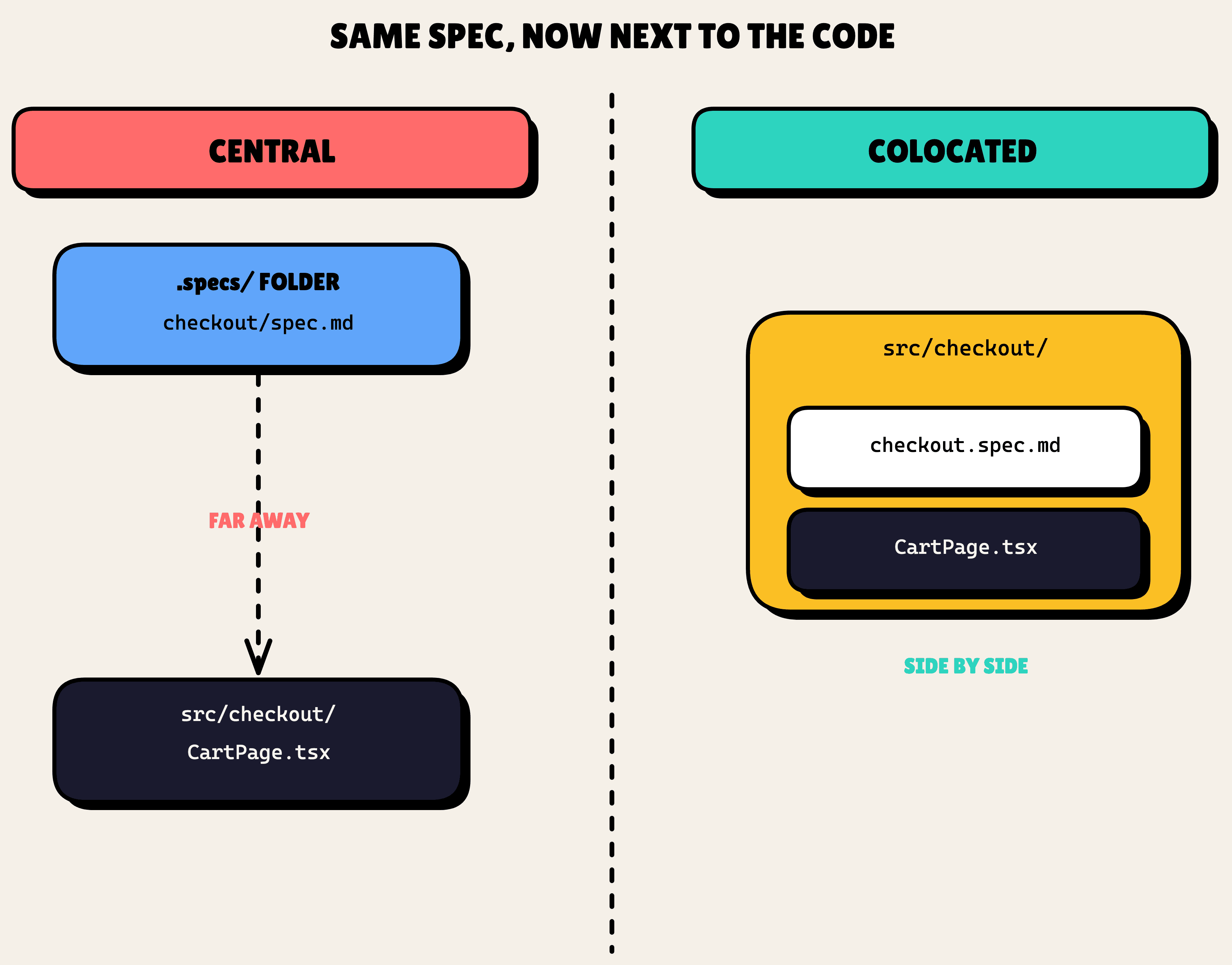
Living specs only lived in one place: .specs/<domain>/spec.md. Central, tidy, and far from the code. The spec for a UI component sat in a completely different part of the tree than the component itself. You would never see one while editing the other.
Real codebases make this worse. They do not keep one capability in one neat folder. Legacy checkout logic gets smeared across src/checkout/, a few files in src/services/, and a stray src/legacy/order*.js nobody has touched in two years. A single-folder rule cannot describe that, and pretending it can is how specs drift away from reality.
So the ask was two-fold. Let a domain's spec sit next to the code it describes. And let "a domain" be defined flexibly enough to cover code that is scattered across the tree.
Where specs can live now
The fix is a few new knobs in .sdd.json, per domain. location is centralized or colocated. specPath overrides where the file lands. And specFormat is open: it controls the filename pattern (spec-<name>.md), so a domain can write spec-component.md, spec-endpoint.md, spec-feature.md, or whatever convention you already use.
For the scattered case, a domain is no longer a single folder. It is pattern ∪ include − exclude: a regex, or a set of include-globs, minus a set of excludes. That is enough to wrangle the messiest legacy area into one coherent spec.
// 📃 .sdd.json
{
  "domains": {
    "auth": {
      "location": "centralized",
      "pattern": "^src/auth/",
    },
    "ui": {
      "location": "colocated",
      "pattern": "^src/components/",
      "specFormat": "component",
    },
    "checkout": {
      "location": "colocated",
      // 👇 one domain, three scattered sources, minus the tests
      "include": ["src/checkout/**", "src/services/order*.ts", "src/legacy/order*.js"],
      "exclude": ["**/*.test.ts"],
    },
  },
}
That covers the three shapes you actually run into: a clean centralized domain (auth), a colocated domain that writes its spec beside each component (ui), and a scattered legacy domain stitched together from globs (checkout).
There is one insight that kept the design small. A "tree of specs," a parent area with detailed leaves under it, is not a special nesting feature. It is just several domains whose paths happen to nest. The parent holds the high-level rules and the diagram. The leaf holds the detailed requirements. No new concept required.
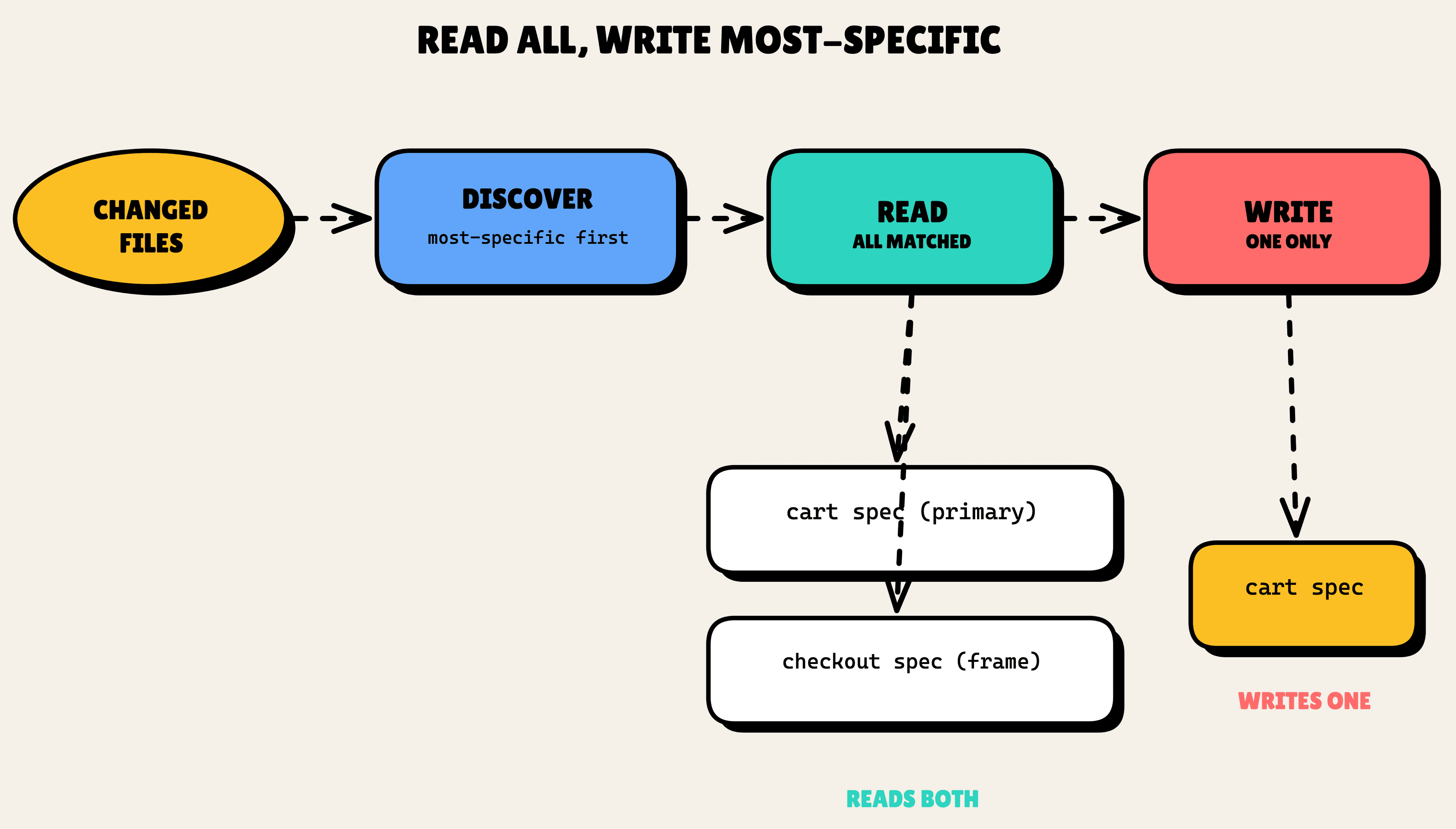
That nesting raises an obvious question: if you edit a file that sits under both a leaf and its parent, which spec wins? The answer is read-all, write-most-specific. When you touch src/checkout/cart/, SDD reads both the cart spec (your primary context) and the checkout spec (the surrounding frame), so the AI sees the full picture. But it writes changes only to the most-specific spec that matches. A requirement never gets duplicated up the tree.
The decision I am proudest of is where that logic lives. All of it (discovery, ordering, most-specific resolution) sits in one tested script, resolve-spec-paths.py, with 20 evals behind it. Not prose scattered across four different skill prompts. If four prompts each re-interpret the same path rule, they drift. Code does not.
Wall 2: you still had to write them all by hand
Now specs could live next to the code. But a brownfield repo starts with zero of them, and that is the harder wall.
/sdd:init only scaffolded an empty .sdd/. /sdd:drift only checked specs that already existed. Nothing in the toolchain could bootstrap a spec from code that was already written. I had built a beautiful place to put living specs and no way to fill it.
Hand-writing a spec per domain across a real app is the kind of chore that sounds reasonable in a planning doc and never actually happens. It had to be automatic, or it was not adoption.
/sdd:init drafts specs from your code
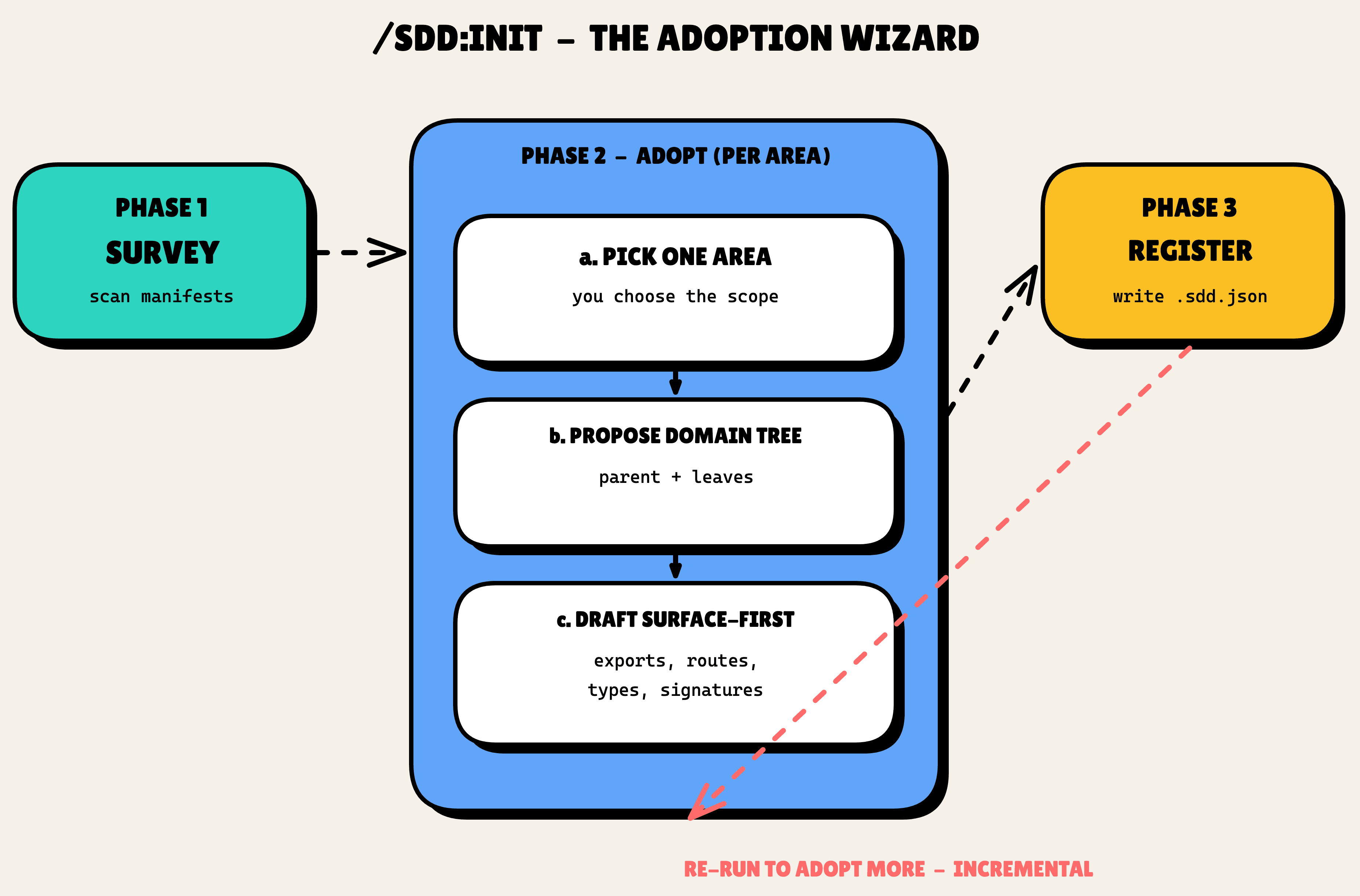
So /sdd:init is now a wizard with two jobs. It scaffolds, and then it adopts, incrementally, one area at a time.
Here is the flow:
- Survey, cheaply. Read the manifests and the top-level folders, propose some candidate areas. No deep file reading yet, this step is meant to be fast and almost free.
- You pick one area. Not the tool. You choose the scope, because you know which slice you are about to work in.
- Propose a domain tree. A subagent explores just that area and suggests a parent plus leaves, with patterns, paths, and formats filled in. You confirm, edit, or drop it.
- Draft surface-first. Parallel subagents read the public surface of the code (exports, routes, props, types, function signatures) and draft each leaf's requirements from what they see.
- Register. Append the new domains to
.sdd.jsonand write the specs at their resolved paths.
The part I care most about is honesty. Every generated spec is marked [DRAFT]. Every requirement is tagged (observed) if the code plainly shows it, or (inferred) if the AI is reading between the lines. Anything genuinely uncertain gets a [NEEDS CLARIFICATION] marker. And any code the subagents could not read reliably gets listed under an ## Uncovered heading instead of being silently skipped.
# 📃 src/checkout/spec-checkout.md

# [DRAFT] checkout Specification

## Requirements

### Requirement: Cart Total

The system SHALL calculate the cart total including tax and shipping. (observed)

### Requirement: Discount Codes

The system SHALL apply a percentage discount when a valid code is entered. (inferred)

<!-- [NEEDS CLARIFICATION] do multiple codes stack, or is it one per order? -->

## Uncovered

- src/legacy/orderLegacy.js — minified, could not read reliably
The AI is allowed to guess. It is not allowed to hide that it guessed. You review a draft knowing exactly which lines are facts and which are bets.
And it is incremental and idempotent by design. Never whole-repo. Always skippable. Re-run it next week to adopt another area, and it will never overwrite a spec you have already reviewed, where "reviewed" means you removed the [DRAFT] marker. The .sdd.json domains map just grows as you work, one area at a time.
For the running example, that looks like this: run /sdd:init, pick the assignments area, watch it propose an assignments domain with a colocated leaf, draft [DRAFT] requirements straight from the code surface, and register it. One area adopted, the rest of the app untouched until you are ready.
Here is what that feels like in the terminal:
$ /sdd:init

SDD is already scaffolded. Switching to adopt mode.

Surveying the repo (manifests + top-level folders)...
Candidate areas:  tasks   users   assignments   notifications

? Which area do you want to adopt first?  › assignments

Exploring src/assignments/ ...
Proposed domain tree:
  assignments          (colocated → src/assignments/spec-assignments.md)
  └─ assignments/api   (colocated → src/assignments/api/spec-endpoint.md)

? Accept this tree?  › yes

Drafting from the public surface (3 subagents)...
  ✓ assignments        7 requirements   (5 observed, 2 inferred)
  ✓ assignments/api    4 requirements   (4 observed)
  ⚠ 1 [NEEDS CLARIFICATION] · 1 file under ## Uncovered

Registered 2 domains in .sdd.json
Wrote 2 [DRAFT] specs. Review them, drop the [DRAFT] marker when you are happy.

Next: run /sdd:init again to adopt another area.
Why surface-first
A few of those choices deserve their reasoning, because each one was a fork I could have taken the other way.
Why read the public surface instead of doing deep behavioral extraction? On legacy code, deep extraction is slow and hallucination-prone. The public surface, the exports and routes and types and signatures, is most of the contract. So drafts read the surface for everything and reserve deep behavioral reading for the one to three primary files of an area. Cheaper, and more honest about what it actually knows.
Why incremental instead of a one-shot whole-repo bootstrap? Because developers work in slices, not in whole repos. A full bootstrap burns tokens generating specs nobody asked for, most of which go stale before they are ever read. The domains map as a registry that grows with your work matches how the work actually happens.
And the tiered-file idea underneath all this, where .spec.md ships now and .arch.md and .coverage.md are reserved for later, is about keeping the always-loaded context lean. Architecture diagrams and test-coverage maps are first-class, but on-demand, not loaded on every run. More on those another time.
All of this came out of a long "grill me" interview I ran on myself, which I then turned into ADR 0002 in the SDD repo. That ADR is now becoming its own feature, a /sdd:grill step that ends in a decision record. Meta, but that is the fun of building in public.
How it shipped
Two stacked PRs. #25 was the resolver and the location config. #26 was the wizard, built on top of #25 before #25 had merged. I did not wait. I branched #26 off #25, kept building, and merged bottom-to-top once both were reviewed. If you have not used stacked PRs, that is the one rule to remember: merge the bottom of the stack first, then the next, so each PR's diff stays honest.
And yes, I dogfooded SDD to build SDD. The whole thing ran through /sdd:auto on the SDD repo itself, including a mid-build course-correction when the grill interview changed the design out from under me. Watching the tool survive its own author changing his mind is the best test I have.
What's next
Two reserved tiers come next: .arch.md for on-demand architecture diagrams, and .coverage.md for the requirement-to-test map that turns specs into a real shift-left on-ramp. After that, the /sdd:grill skill, the design interview as a repeatable step that ends in an ADR.
If you want to try the adoption ramp yourself: /plugin marketplace add alfredoperez/sdd, then run /sdd:init in a repo you actually have, and pick one messy area.
Next time: living specs in daily practice, what happens after adoption. Follow along at github.com/alfredoperez/sdd.