Layered Context Foundation
SDD loads four layers of context automatically: principles, living specs, feature deltas, and ADRs, so your specs stop dying the moment a PR merges.
Update — SDD is now the SpecKit Companion. The ideas in this post have been folded into SpecKit Companion, a VS Code extension for spec-driven development. The story of the move starts in Build Log 0.
It is six months after you shipped a feature. You are back in the same corner of the codebase, you ask your AI assistant for a small change, and it confidently invents a convention. Not just any convention. The exact one you wrote down, in the spec, for the last feature you shipped right here.
The spec still exists. It is sitting in specs/032-some-feature/spec.md. But nobody opens it. Not you, not the AI. It went write-once the moment the PR merged, and it has been a fossil ever since.
I hit this every single week. My specs were useless five minutes after they shipped. So I fixed it: four layers of context that load automatically, at the right moment, with no work from me. This is the model SDD is built on, and it is the reason my specs stopped disappearing.
A quick word on SDD
If you already know SDD, skip to the next section.
SDD is my spec-driven development plugin for Claude Code. (For the full origin story, see What is SDD.) Every feature runs through four steps: /sdd:specify → /sdd:plan → /sdd:tasks → /sdd:implement. It auto-detects how big a change is and right-sizes the ceremony, so small changes fast-track and big ones get the full pipeline. Sessions resume from a .spec-context.json state file, and there are three checkpoints during implement (CP1, CP2, CP3) where your approval actually matters. If you have used SpecKit or openspec, SDD is in the same family. Just a Claude Code plugin, leaner, with adaptive ceremony. The repo is at github.com/alfredoperez/sdd.
When specs become fossils
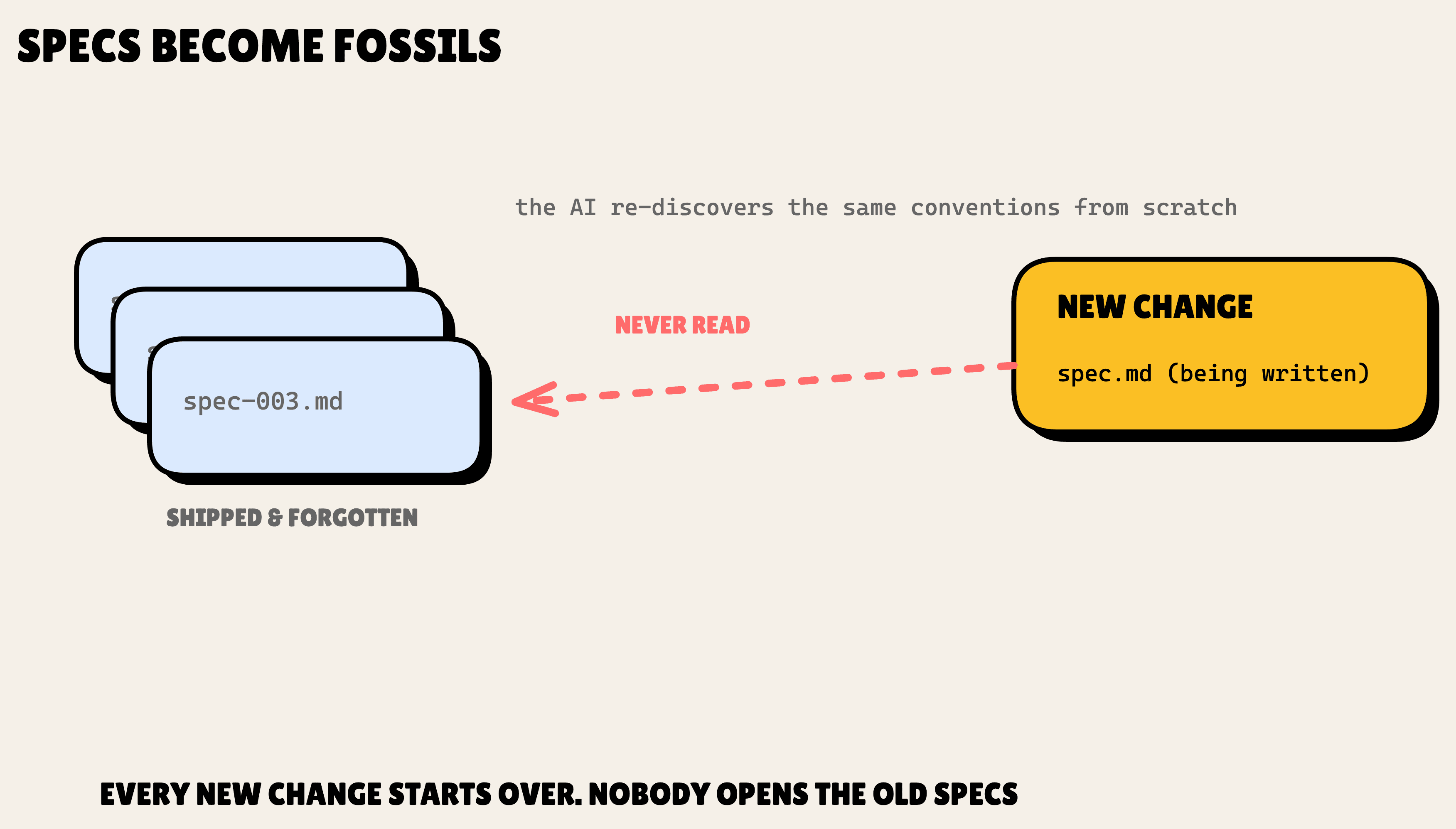
Here is the thing about one-shot specs. You write spec.md, you ship the feature, and you never read it again. The spec describes the most important thing about that part of your system, and it stays invisible to the one tool doing the work.
The consequences compound. Brownfield work turns hostile, because every new change re-discovers the same conventions from scratch.
Project rules like "all UI uses the design system" live in your head, in the README, in a Slack thread from March. Never in front of the AI. And past decisions have no home at all. Six months from now, "why did we use a join table for assignments?" is a question you answer with git archaeology.
Let me make this concrete with an example I will reuse for the rest of the article. We are building a project management app. Earlier specs already defined two domains: tasks and users. Now we want a new feature. Users can be assigned to tasks, and a user's profile shows the tasks assigned to them. That one sentence touches both domains. With one-shot specs, the AI re-derives both from scratch, and it gets them subtly wrong, because it never saw what was already there.
Four layers, one cascading load
The fix is four layers of context, each loaded automatically at the right pipeline step.
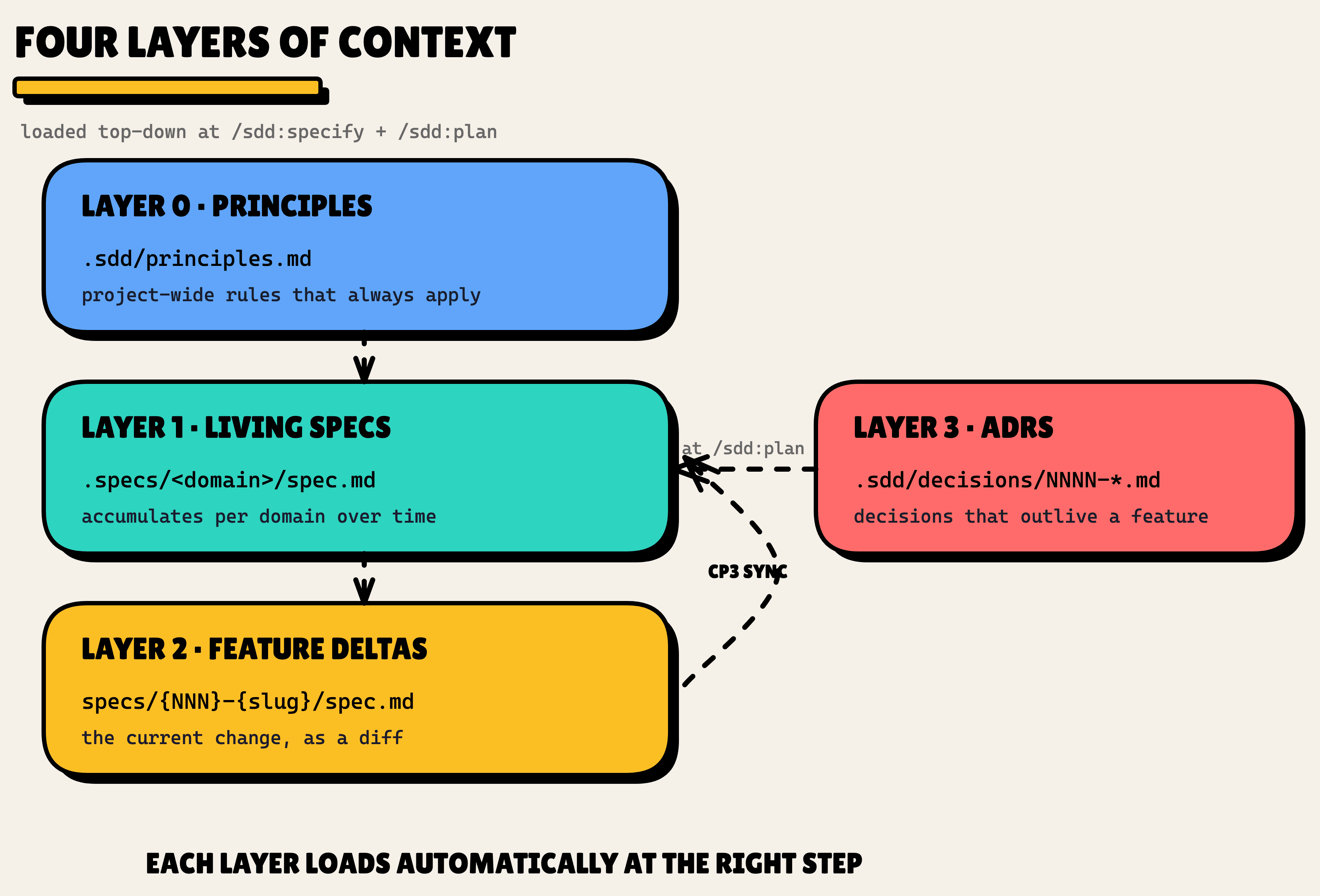
- Layer 0, Principles (
.sdd/principles.md): project-wide rules that always apply. - Layer 1, Living specs (
.specs/<domain>/spec.md): one accumulating spec per domain. The de-facto constitution for that part of the system. - Layer 2, Feature deltas (
specs/{NNN}-{slug}/spec.md): the current change, written as a diff against what already exists. - Layer 3, ADRs (
.sdd/decisions/NNNN-<slug>.md): architectural decisions that outlive any single feature.
The punchline is the automation. Each layer loads at the right moment on its own. You write a spec, and SDD loads everything else around it. Let me walk through each one.
Layer 0: Principles
This is the smallest layer and the easiest to explain. Principles are the things that must always be true in your project. They live in .sdd/principles.md, the file is optional, and SDD discovers it by presence. No config required.
The format is a plain bullet list. No version numbers, no change-tracking ceremony. I borrowed the concept from spec-kit's Constitution and left the bureaucracy behind.
# 📃 .sdd/principles.md

# Project Principles

- All UI components must use the design system primitives (no raw Tailwind for brand-tinted elements).
- Cross-domain data writes must be wrapped in a transaction.
- User-visible strings must go through i18n.
Here is how it gets used. During /sdd:plan, once the Approach section is drafted, SDD scans it against your principles. Not a string match, an intent match. If the plan conflicts with a principle, you get one line in the plan footer:
⚠ 2 principles concerns — see plan.md § Principles Check
Clean plans get ✓ Principles check passed instead.
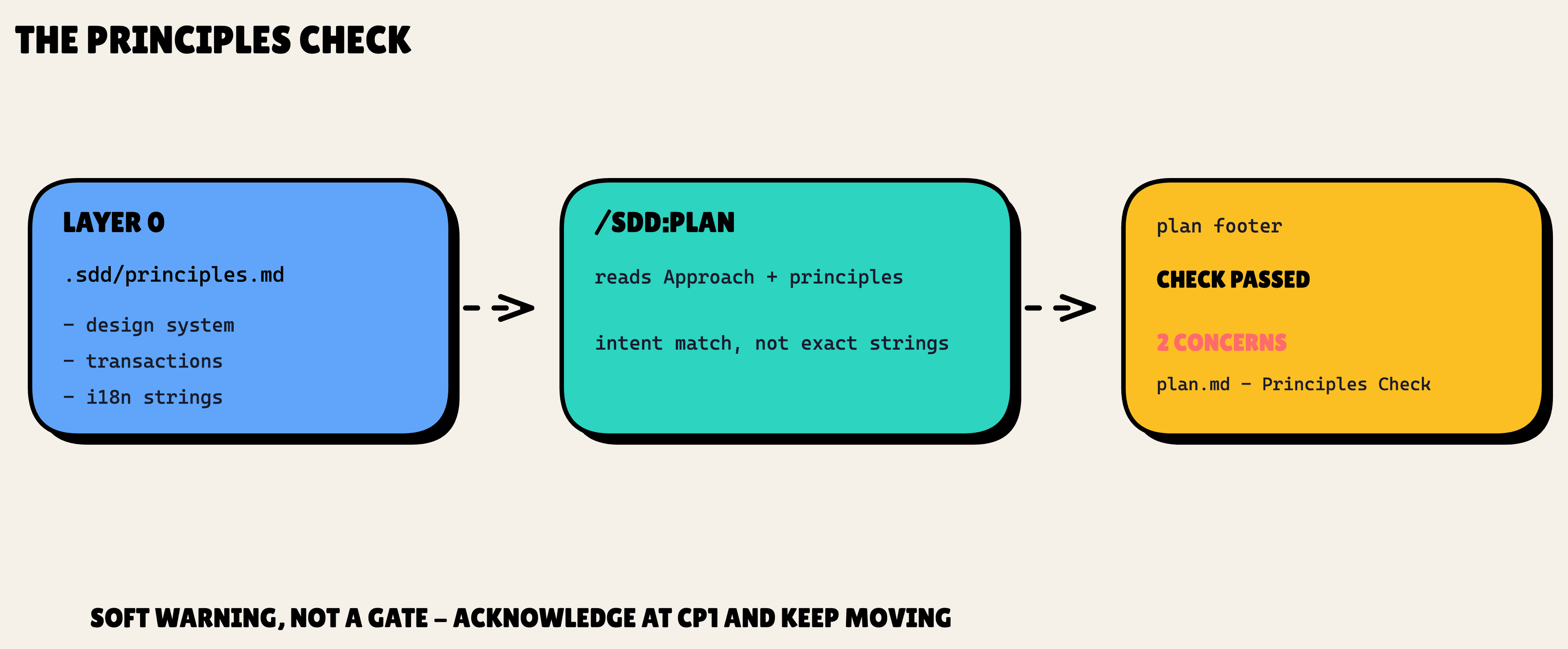
Notice the word "concern," not "error." This is a soft warning, not a gate. If your Approach hardcodes UI strings, you get the footer line and the pipeline keeps moving. You address it or acknowledge it at CP1. spec-kit gates here and stops you. SDD trusts you to make the call. That is the leanness showing through.
Layer 1: Living specs
This is the big one. A living spec is a single file per domain that accumulates over time. For our app, that means .specs/tasks/spec.md and .specs/users/spec.md.
The format is borrowed verbatim from openspec's capability-scoped template:
# 📃 .specs/tasks/spec.md

# tasks Specification

## Purpose

Manage tasks for project teams.

## Requirements

### Requirement: Task Creation

The system SHALL allow project members to create tasks with a title and description.

#### Scenario: Create a task

- **WHEN** a project member submits a new task
- **THEN** the task appears in the project's task list
One detail that matters: scenarios use four hashtags (####). That keeps them parser-friendly, and it is the openspec convention SDD adopts.
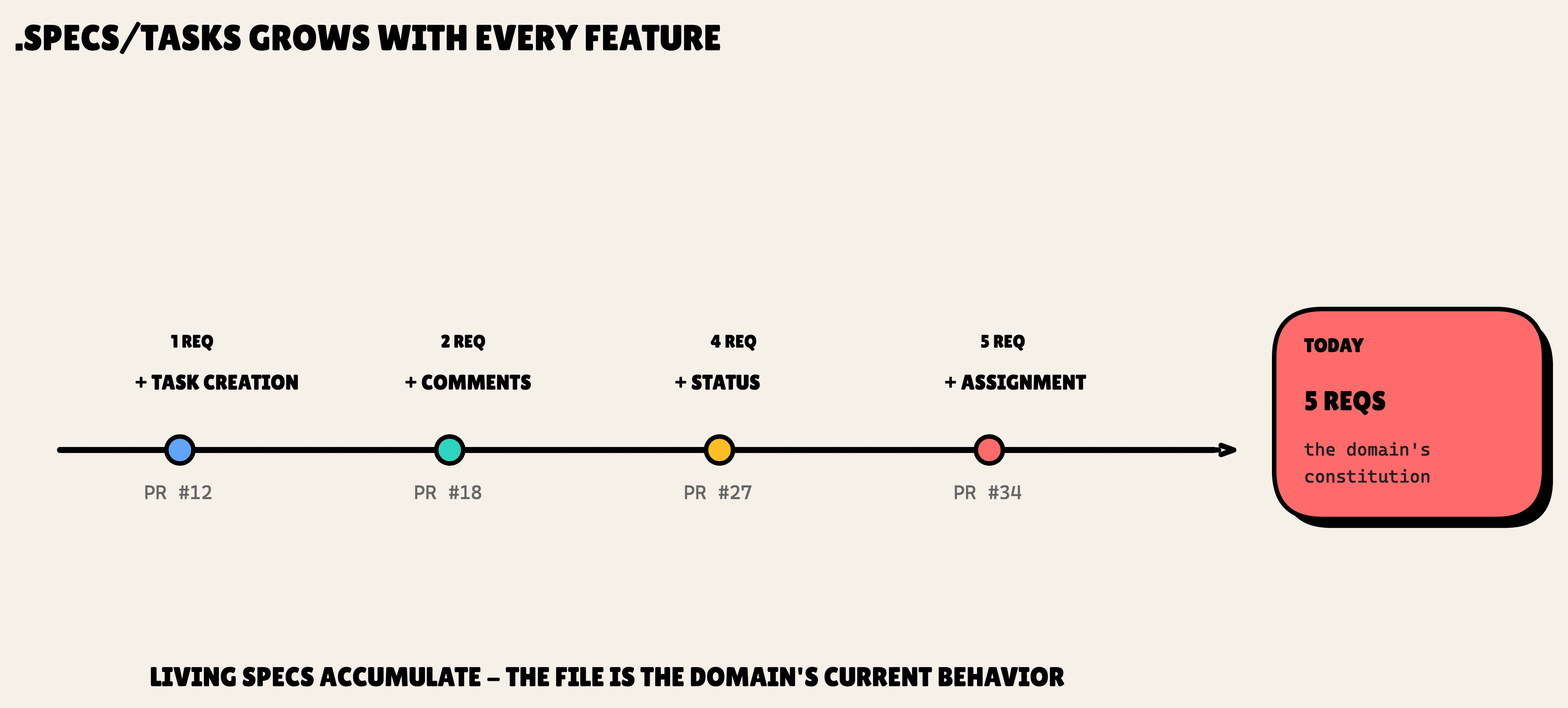
Here is the big idea. This file grows. Every feature that touches the tasks domain merges its requirements into it. After a handful of shipped features, .specs/tasks/spec.md holds Task Creation, Task Comments, Status Transitions, and more, each as its own ### Requirement: block. The file is the domain's constitution. But unlike the static principles file, it is the actual, current state of behavior.
Now the automation. When you run /sdd:specify "task assignment", SDD figures out which domains the change touches by matching file paths against the domains.<name>.pattern regex in .sdd.json. Our feature touches files under tasks/ and users/, so SDD loads both .specs/tasks/spec.md and .specs/users/spec.md into context.
That is the whole game. The AI now knows what already exists. The task-assignment spec it writes references the existing requirements correctly, instead of redefining them and getting them wrong.
Layer 2: Feature deltas
The living spec is the accumulated truth. The feature delta is the change you are making right now. It lives where features have always lived, in specs/{NNN}-{slug}/spec.md, numbered per feature.
What is new is the format. A delta is written as a set of operations against the living spec:
## ADDED Requirementsfor new requirements## MODIFIED Requirements, which copies the entire original block and edits it in place## REMOVED Requirements, which must include a**Reason:**and a**Migration:**## RENAMED Requirements, inFROM:/TO:form
Run our example:
/sdd:specify "users can be assigned to tasks; user profile shows assigned tasks"
SDD produces a delta that spans both domains:
# 📃 specs/042-task-user-assignment/spec.md

# Spec: Task Assignment

**Slug**: 042-task-user-assignment | **Date**: 2026-05-03

## ADDED Requirements (tasks domain)

### Requirement: Task Assignment

The system SHALL support assigning a user to a task as the assignee.

#### Scenario: Assign user to task

- **WHEN** a project member with edit permission opens a task and selects an assignee
- **THEN** the task displays the assignee's name and avatar

## MODIFIED Requirements (users domain)

### Requirement: User Profile

# 👇 the entire original "User Profile" block, copied from .specs/users/spec.md

- The profile page SHALL display the user's currently-assigned tasks.

#### Scenario: View assigned tasks

- **WHEN** the user opens their profile
- **THEN** the profile shows a list of tasks where they are the assignee
The MODIFIED block carries the full original requirement, not just the diff. Your reviewer sees exactly what the requirement said before and exactly what changed.
Then comes the part that makes "living" specs actually live. At CP3, when the feature closes, SDD syncs the delta back into Layer 1. The ADDED block appends to .specs/tasks/spec.md. The MODIFIED block finds the matching requirement in .specs/users/spec.md and replaces it in place, by header match. One cross-domain feature, both living specs updated, atomically.
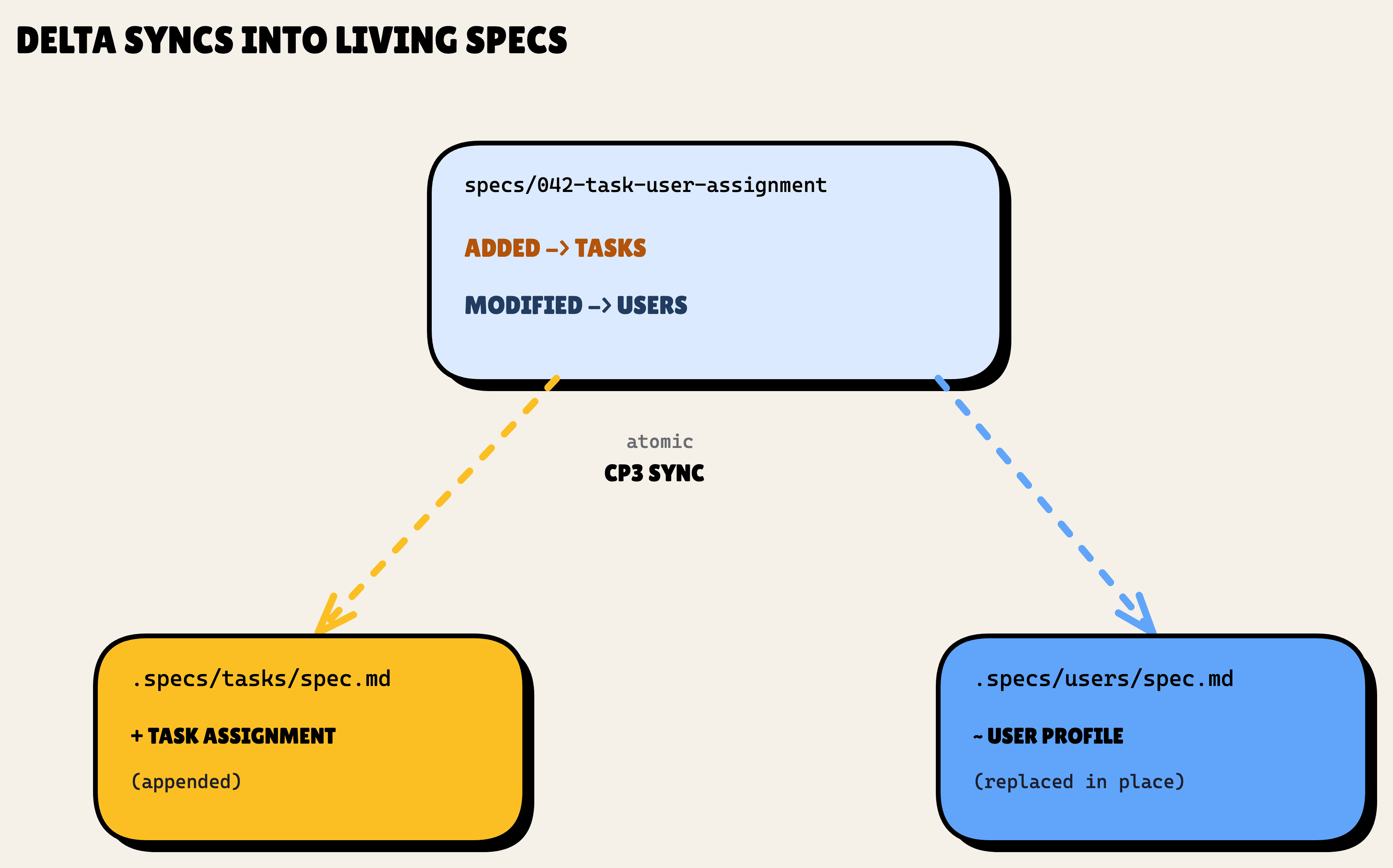
The delta did its job and then disappeared into the living specs. That is the opposite of a fossil.
Layer 3: ADRs
Some choices are bigger than a single feature. While planning task assignment, you hit one. Do you store the assignment as a foreign key on tasks, which gives you one assignee per task, or as a join table, which gives you many? That is not a requirement. It is an architectural decision that will shape every future feature in this area.
That is what Layer 3 is for. ADRs live in .sdd/decisions/NNNN-<slug>.md, four-digit numbered and sequential.
SDD does not make you remember to write them. During /sdd:plan, a Decision Significance Heuristic counts signals: three or more alternatives on the table, cross-domain impact, a new external dependency. Score two or more, and it prompts:
This looks like an architectural decision. Draft an ADR? (Yes / No / Skip)
Say yes, and it scaffolds .sdd/decisions/0042-task-assignment-data-model.md from a template with the sections you would expect: Status, Date, Deciders, Context, Decision, Rationale, Alternatives Considered, Consequences, Related. The shape is openspec's design.md Decisions section, lifted into a standalone file.
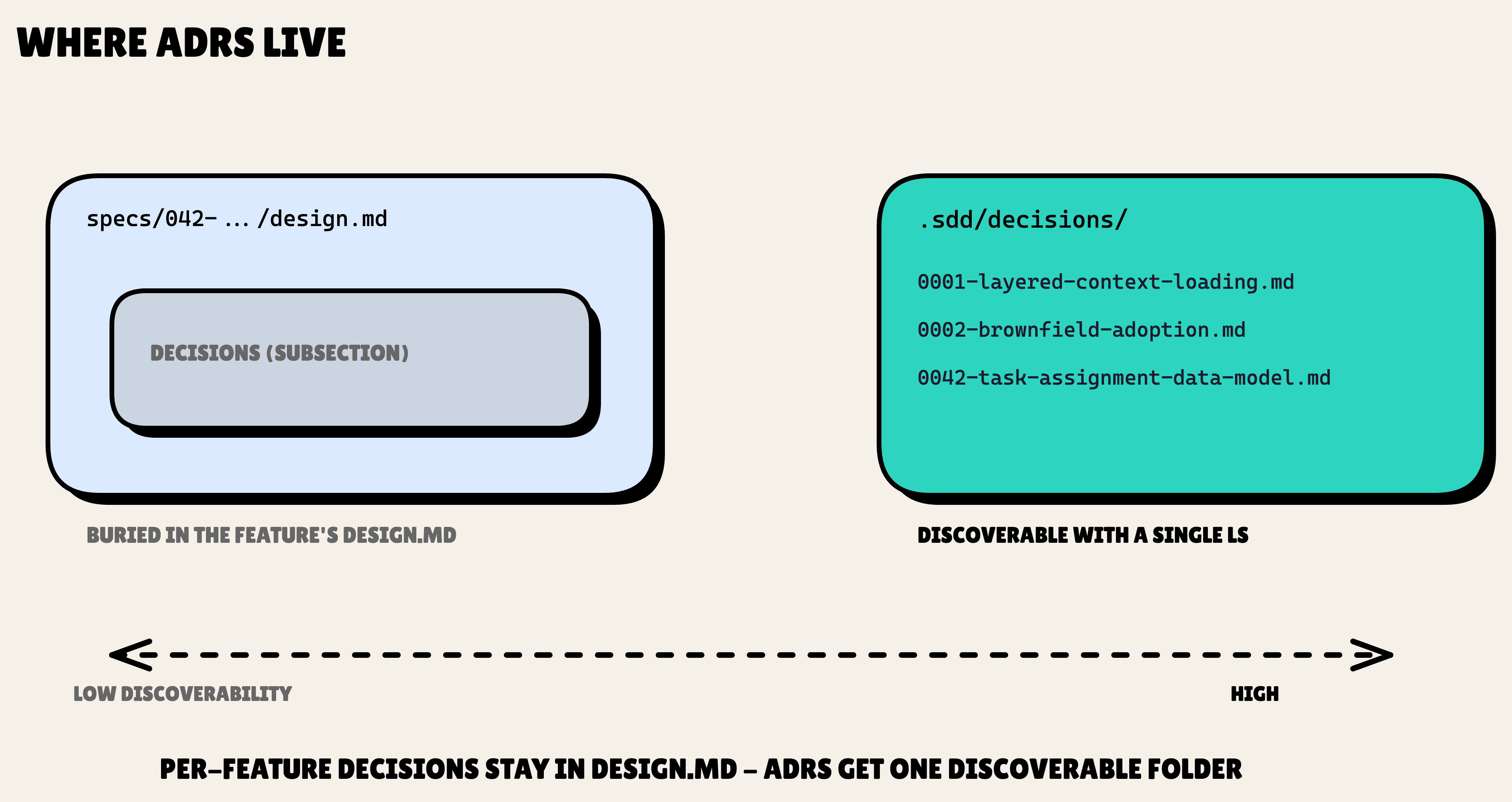
Why a standalone file instead of a section inside design.md? Discoverability. A cross-feature decision is useless if you have to read every old feature's design.md to find it. ADRs sit in one folder you can ls. Per-feature decisions still live in that feature's design.md. The .sdd/decisions/ folder is reserved for the choices that outlive any single feature. The first ADR I wrote, 0001-layered-context-loading.md, documents this very design.
Putting it together
Here is the whole thing on one run of the example.
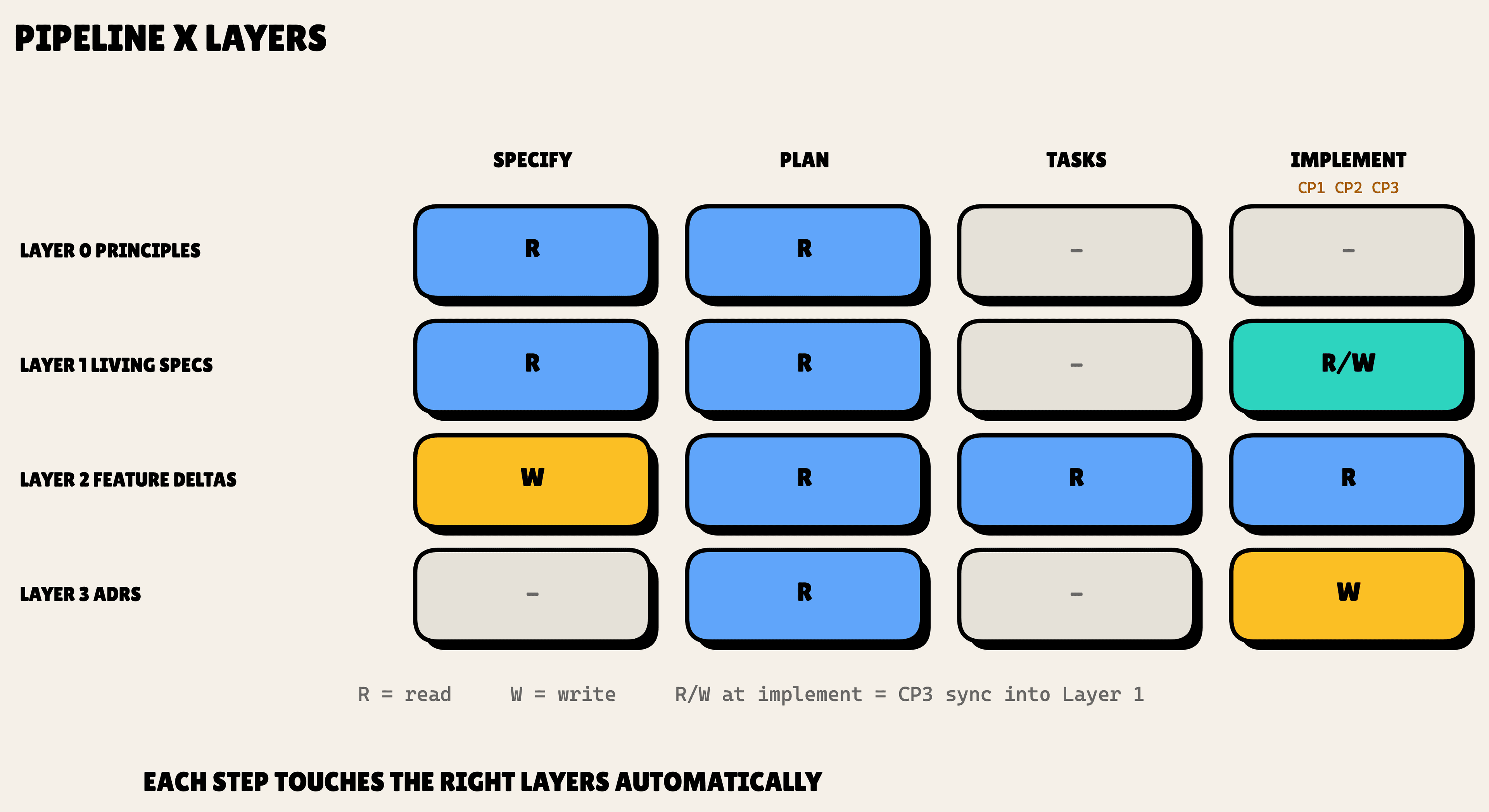
/sdd:specify loads the principles (Layer 0), detects the tasks and users domains, loads both living specs (Layer 1) and any relevant ADRs (Layer 3), then writes the feature delta (Layer 2). /sdd:plan re-loads everything and runs three checks (Principles, Domain Alignment, and the Decision Significance Heuristic), summed up in one footer:
✓ Principles check passed · ✓ Aligned with tasks, users domains · 1 ADR drafted: 0042-task-assignment-data-model
/sdd:implement builds it, with CP1 and CP2 as review checkpoints. At CP3 the deltas sync into Layer 1: both .specs/tasks/spec.md and .specs/users/spec.md update, and ADR 0042 is committed alongside.
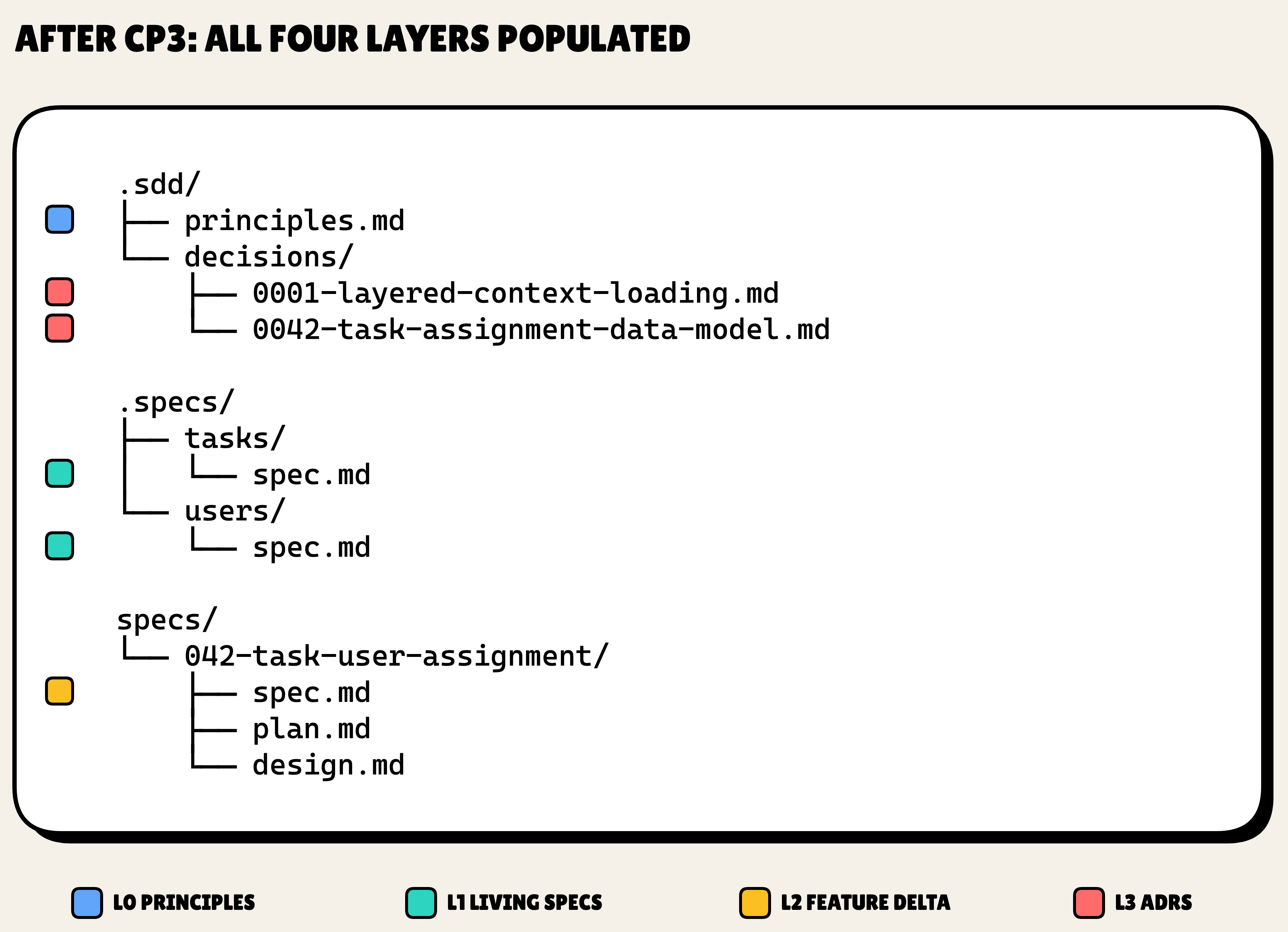
Now fast-forward six months. Someone touches this area again. SDD loads .specs/tasks/spec.md, which now includes the assignment requirement, plus .specs/users/spec.md, which now includes the profile change, plus ADR 0042 explaining why the data model looks the way it does. The context is just there. The specs did not disappear.
What's next
This is the foundation the rest of the series builds on. Each piece after this drills into one layer in practice.
Next up is Brownfield Adoption: how this model meets a real, messy repo. Specs that live next to your code, and SDD drafting them from what is already there, one area at a time.
Follow along as each layer lands. The repo is at github.com/alfredoperez/sdd.